
Security findings
Devexana checks stored configurations and firewall rules. A person confirms or dismisses each finding. This page explains the checks, hints and Security screen.
- Available
- Configuration and firewall rule checks (34 total), on by default · Known-exploited (CISA KEV) and end-of-life hints · Firewall rule checks on stored rules from Sophos XML API or Linux nftables text
- Available
- Firewall rule checks through the Barracuda CloudGen REST API. Devexana sets up this connector for your instance during onboarding
On this page
Devexana runs 34 fixed checks. Each finding starts as a proposal. The checks read data that is already on the appliance. They do not contact network devices.
What Devexana checks
Configuration and firewall rule checks flag issues such as any-any rules, enabled Telnet and default SNMP communities. Each check has a fixed severity.
| Check | Applies to | Severity |
|---|---|---|
| Default SNMP community | Device configuration | Critical |
| Telnet enabled for remote management | Device configuration | High |
| Cleartext HTTP management server | Device configuration | High |
| SNMP v1 or v2c in use | Device configuration | Medium |
| Any-any rule | Firewall rules | High |
| Default accept policy | Firewall rules | High |
| Rule order problem | Firewall rules | High |
| Shadowed rule | Firewall rules | Medium |
| Redundant rule | Firewall rules | Low |
| Rule without logging | Firewall rules | Low |
The table lists examples. The full set has 34 checks.
When the checks run
The scan runs when a person starts it or as a step in a routine. It is not continuous.
- To run the scan on a schedule, add it as a step in a routine. See Routines (scheduled reports).
- A scan uses the configurations and rules that Devexana read last. Before you act on a finding, check when Devexana last read the configurations and rules.
Confirm or dismiss a finding
Each finding starts as a proposal. A person confirms it or dismisses it.
To review a finding, do these steps:
- Open Networking › Firewall › Pentest.
- Select a finding.
- Read the record that the finding comes from.
- Compare the record with the device or the firewall rule.
- If the record supports the finding, confirm it.
- If the record does not support the finding, dismiss it.
Known-exploited and end-of-life hints
Devexana compares the stored inventory with the CISA Known Exploited Vulnerabilities catalogue and with an end-of-life list. Both lists are copies bundled with the release.
- A match is a hint. Devexana does not evaluate version ranges.
- For each match, check the vendor's advisory.
The Security screen
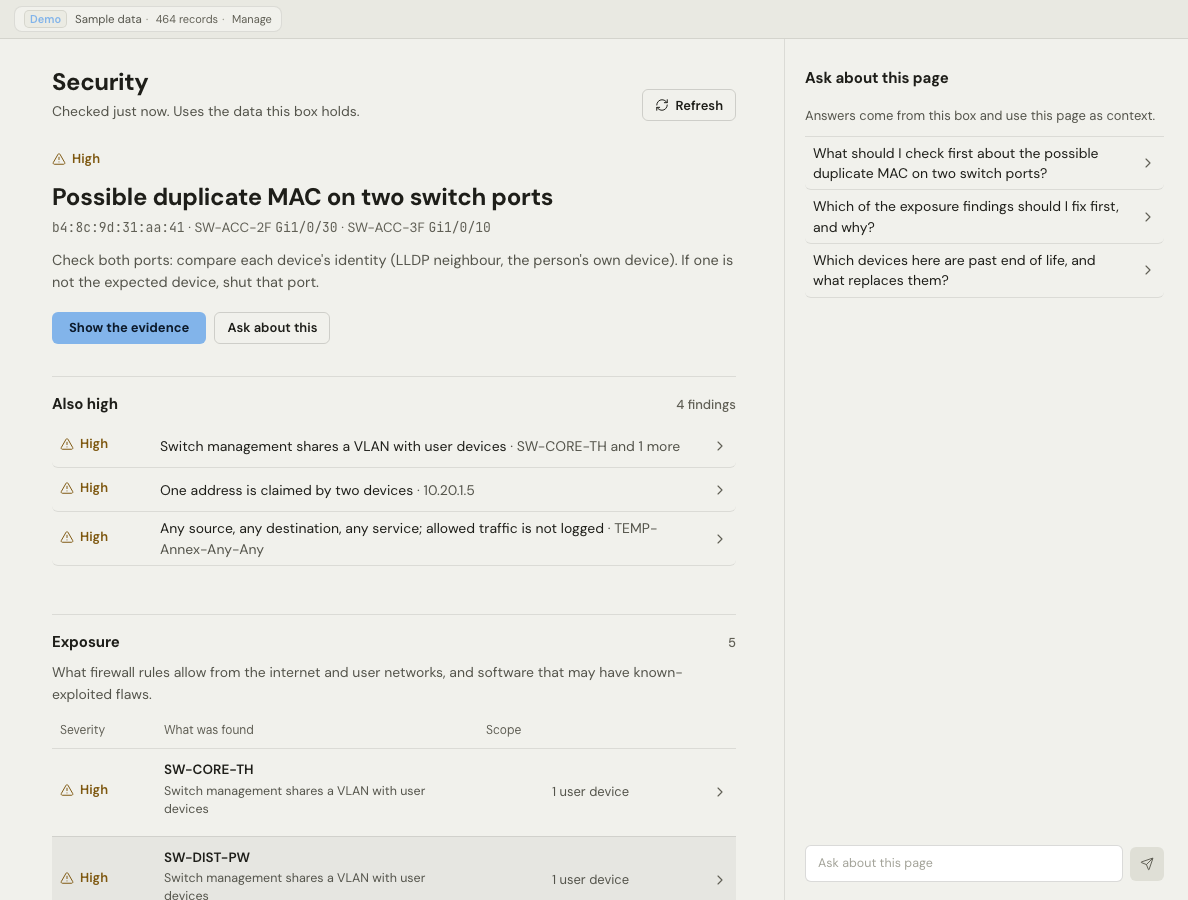
The default profile hides the Security screen. A display setting controls its visibility for each installation. The screen groups findings into five sections.
| Section | What it shows |
|---|---|
| Exposure | Services that stored records indicate are reachable from the internet or user networks, and software with potential known-exploited matches |
| MAC spoofing | One MAC address on two ports at the same time, MAC addresses that move between ports, and names that change hardware |
| Addressing (IPv4) | Address conflicts and overlaps, then the subnets and VLANs that the switches report |
| Legacy | Software and firmware past end of life, grouped by release |
| Firewall rules | Rules in the stored rule set that need a review |
Each section identifies the records Devexana read and the records it did not read. An empty section does not establish that no issues exist. The screen does not contact network devices.
Limits
Applies to Devexana release 0.3.182. Page updated 2026-10-20. Questions or corrections: support@devexana.com.