
Sources and support tiers
A source gives Devexana read-only access to one system. This page explains setup, read schedules, health states and support tiers.
- In production use
- Aruba/HP AOS-S switches over SSH and SNMP; Barracuda CloudGen over SSH and syslog; Freshservice
- Available
- The other switch command sets and API sources on the vendors page. Devexana sets up ServiceNow and the SaaS sources for your instance during onboarding
On this page
A source is a read-only link from Devexana to one of your systems. An administrator adds each source. Sources added through the Connectors wizard need approval of each read function. Devexana then re-reads the source on a schedule.
How a source works
Switches and the Barracuda CloudGen SSH source use separate setup procedures. They do not use the Approve reads step. A read-only command allowlist limits their commands. See Switches over SSH and SNMP and API connectors and ticketing.
Administrator procedure for the Connectors wizard:
- Open the Connectors screen.
- Select Add connector.
- In Choose a source, select the source type.
- In Provision access, follow the steps to create a read-only account.
- In Connect, enter the system address.
- Enter the read-only credential.
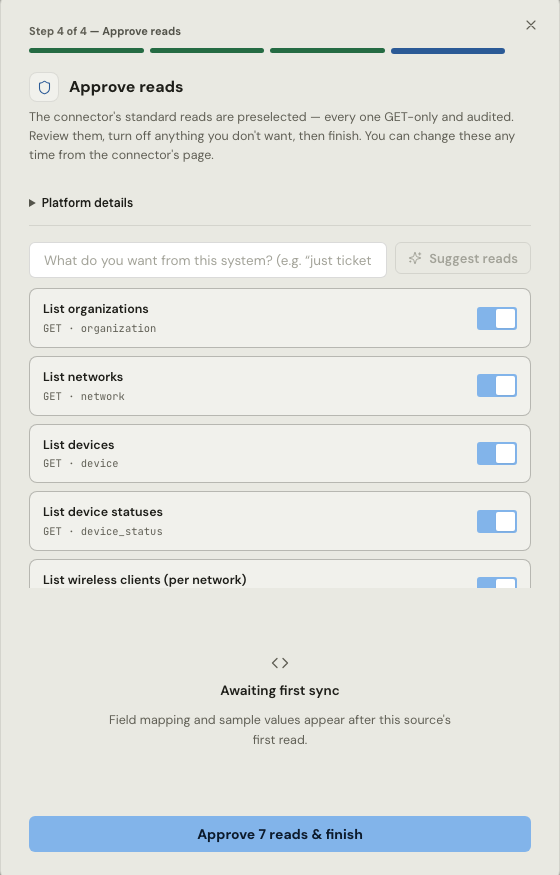
- In Approve reads, review the preselected read functions.
- Turn off each read function that you do not need.
- Approve the selected read functions to finish.
For sources added through this wizard, no read function runs before an administrator approves it. Devexana records the approval in the audit log. The wizard cannot approve a write function.
How often a source is read
By default, Devexana reads sources every 15 minutes and network devices once a day. If a read fails, Devexana starts the next read from the last successful point.
What read-only means for a source
Sources only read. If a source declares a write operation, Devexana rejects it when it loads. Separate features can write to business systems, through actions that a person controls. Each one is inactive or off until an administrator sets it up. In this release, Devexana disables network-device configuration changes in code. Switch commands must pass a read-only command allowlist.
Read-only sources lists each write path and its default in the table "What can write".
Each transport has its own check. SSH commands pass an allowlist. SNMP uses GET and GETNEXT requests only. API sources use read methods only. Read-only sources describes each check.
Health states
Each source shows a health state: healthy, degraded, stalled, broken or expired credential. Devexana computes the state from each re-read. See Source health states for an explanation of each state and the troubleshooting actions.
Where credentials are kept
Each source uses a read-only account. Devexana shows the steps to create one, and stores the credential encrypted on the appliance. Each time Devexana reads a stored credential, it writes a record to the audit log. Encryption and credentials describes credential storage, and Create read-only accounts describes each account type.
Support tiers
Each source has one support tier. The badges at the top of each page show it.
- In production use: the source runs at a live deployment.
- Available: the source is supported in this release.
- Off by default: the source or feature is supported. An administrator turns it on.
Switches over SSH and SNMP lists the supported switch families. API connectors and ticketing explains API connectors and ticketing sources. Supported vendors and protocols gives the tier, transport and data for each vendor.
Listeners and imports are not sources
Receive-only listeners for syslog, SNMP traps and NetFlow are not in the source list. An administrator turns them on in Networking › Firewall › Logs. Syslog, SNMP traps and NetFlow describes them. File imports, port maps and site files are also separate. Import files, port maps and DHCP leases describes them.
Applies to Devexana release 0.3.182. Page updated 2026-10-20. Questions or corrections: support@devexana.com.