
Switches over SSH and SNMP
Devexana reads switches and routers through read-only accounts. This page explains the supported switch families, transports, commands and read schedules.
- In production use
- Aruba/HP AOS-S (ProCurve) switches over SSH and SNMP
- Available
- Command sets for the other supported switch families; SNMP reads of other vendors; the read-only command console
- Off by default
- The extended read set (appliance setting)
On this page
Devexana reads switches and routers with read-only accounts over SSH, SNMP or NAPALM getters. By default, it reads each switch once a day. In this release, Devexana disables network-device configuration changes in code.
Supported switch families
- Aruba/HP AOS-S (ProCurve)
- Aruba AOS-CX
- Cisco IOS, IOS-XE, IOS-XR and NX-OS
- Arista EOS
- Juniper Junos
- HP Comware
- Dell OS10, OS9 and OS6
The SNMP source also reads switches from other vendors through standard MIBs: system, interfaces, VLANs, LLDP and CDP neighbours, the forwarding table and PoE. Supported vendors and protocols gives the transports for each family.
What each transport gives you
| Transport | What Devexana reads |
|---|---|
| SSH, default read | Default command: show running-config. On AOS-S, Devexana also builds an identity record from the output. See Default read: once a day for exceptions |
| SSH, extended read set | The read commands for the switch family. See the command lists below |
| SNMP v2c or v3 | Identity, interfaces with speed, duplex and state, VLANs and port membership, LLDP and CDP neighbours, the forwarding (MAC) table, PoE status and PoE class. No optics data |
| NAPALM getters | Facts, interfaces, addresses, LLDP neighbours, MAC and ARP tables, interface counters and environment data |
NAPALM getters work with the drivers ios (also for IOS-XE), iosxr, nxos, eos, junos and aoscx. No NAPALM driver exists for AOS-S.
Devexana reads no SNMP counter, error or CPU values. Interface counters come only from NAPALM getters.
Default read: once a day
By default, Devexana reads each switch once every 24 hours. The default scheduled SSH read runs show running-config. If Platform is empty and no earlier read identified the OS family, Devexana also runs show version once to identify it.
These fields on the switch source control the read:
| Field on the source | What it does |
|---|---|
| Read commands | Replaces the default read with your own list. Each command must pass the read-only allowlist |
| Pull interval (minutes) | Sets how often Devexana reads the switch. The default is 1440 minutes |
| Scheduled pulls | Turn it off to read the switch only when a person asks |
| Platform (for show-output parsing) | Names the OS family. If it is empty, Devexana runs show version once to detect the family |
A signed-in user can also request a refresh from the switch page.
The extended read set
The extended read set is off by default. Your installer or Devexana support can enable it with the appliance setting DEVEXANA_DEVICE_READ_SET=1. It has no field on the Settings screen. A Read commands list on the source takes priority over the extended read set. If Devexana cannot identify the OS family, it runs the default read only.
Devexana runs all commands for one scheduled read in one SSH session.
Aruba/HP AOS-S
Each list below shows the commands for one area.
Identity and system
show version
show system
show modules
show system temperature
Ports and VLANs
show interfaces brief
show vlans
show power-over-ethernet brief
Neighbours and tables
show lldp info remote-device
show mac-address
show arp
show ip route
show spanning-tree
Optics
show interfaces transceiver
show interfaces transceiver detail
Configuration
show running-config
show config
On AOS-S, show config returns the startup configuration.
On AOS-S, show interfaces transceiver detail returns the digital diagnostics of each optic, for example receive power, with the vendor thresholds.
Cisco, Arista, Juniper, Aruba AOS-CX, HP Comware and Dell
Each list below shows the commands for one switch family.
Cisco IOS, IOS-XE, IOS-XR
show version
show inventory
show interfaces status
show vlan brief
show lldp neighbors detail
show cdp neighbors detail
show power inline
show ip arp
show ip route
show spanning-tree
show running-config
show startup-config
Cisco NX-OS
show version
show inventory
show interface status
show vlan brief
show lldp neighbors detail
show cdp neighbors detail
show ip arp
show ip route
show spanning-tree
show running-config
show startup-config
Arista EOS
show version
show inventory
show interfaces status
show vlan
show lldp neighbors detail
show ip arp
show ip route
show spanning-tree
show running-config
show startup-config
Juniper Junos
show version
show chassis hardware
show interfaces terse
show vlans
show lldp neighbors
show arp
show route
show configuration
Aruba AOS-CX
show version
show system
show interface brief
show vlan
show lldp neighbor-info
show arp
show ip route
show spanning-tree
show running-config
show startup-config
HP Comware
display version
display device
display interface brief
display vlan all
display lldp neighbor-information
display arp
display ip routing-table
display current-configuration
display saved-configuration
Dell OS10
show version
show inventory
show interface status
show vlan
show lldp neighbors
show ip arp
show ip route
show running-configuration
Dell OS9
show version
show inventory
show interfaces status
show vlan
show lldp neighbors detail
show arp
show ip route
show running-config
Dell OS6
show version
show system
show interfaces status
show vlan
show lldp remote-device all
show arp
show ip route
show running-config
The default SSH read runs no port, PoE, neighbour or optics command. To collect that data over SSH, list Read commands on the source or use the extended read set. SNMP provides the interface, VLAN, neighbour, forwarding-table and PoE data listed in What each transport gives you. SNMP does not provide optics data.
Add a switch
Each switch source uses one transport. To read a switch over SSH and over SNMP, add the switch once for each transport. You can also add switches from switch discovery. See Switch discovery.
Administrator procedure:
- Open Networking › Switch Config › Switches.
- Select Add a switch.
- In Host or IP, type the management address of the switch.
- Select the transport: SSH, API (NAPALM getters) or SNMP.
- Enter the read-only credential for that transport.
- Select Add switch.
- For SSH and API, compare the host key fingerprint with the key on the switch.
- If the fingerprint is correct, select Trust this host key.
Devexana detects the OS family of the switch on the next read.
The switch appears on Networking › Devices › Inventory with the time of its last read.
If the switch is listed but not read, go to A switch is listed but not read. If the data looks old, go to Data looks stale.
What Devexana does on the device
- Every SSH command passes a read-only allowlist and a ban on shell metacharacters.
- SNMP uses GET and GETNEXT requests only.
- NAPALM uses getters only.
- Devexana masks device secrets in the output before it stores the output. It keeps a hash of the original output.
- For scheduled reads, Devexana records each command in the device command log. Devexana records console and assistant reads in the audit log.
In this release, Devexana disables network-device configuration changes in code. Read-only sources describes each read-only check.
The console and the switch-page assistant
The console opens from Open console on a switch page. It runs read commands that pass the allowlist. Any signed-in user whose role includes read access can use it.
Ask network questions in the assistant on the switch page, Ask about this switch. To answer, the assistant can run these reads on that switch:
- ARP, MAC table, VLAN, LLDP and CDP reads.
- One
showordisplaycommand that passes the allowlist. - On AOS-S, a fixed set of REST read resources.
Devexana masks device secrets in the output before a model reads it.
By default, Devexana produces answers with models that run on the appliance. A deployment can run with no cloud model. In production, customers do not bring their own model keys. If a deployment uses a cloud model, Devexana provides it through Devexana's zero-data-retention (ZDR) agreement on AWS. The optional networking assistant uses a cloud model only when Devexana has set up the cloud connection for that deployment. Other cloud features are off by default. Devexana records each networking-assistant request in the egress log on the appliance. Outbound connections: the complete list lists every outbound connection and where it is recorded.
What you get
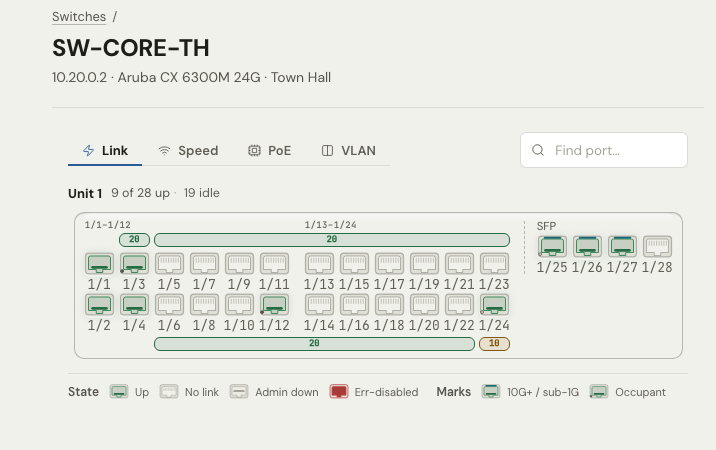
- The switch faceplate, with link state, speed, PoE and VLAN for each port.
- Port trace and neighbour links from LLDP and CDP neighbours.
- Links between buildings on the campus map, from your site file.
- Configuration history. Devexana keeps a new version when the configuration changes, and shows the difference between versions.
Network views: campus map and switch faceplate describes these views.
Applies to Devexana release 0.3.182. Page updated 2026-10-20. Questions or corrections: support@devexana.com.