
Security overview
This page identifies each control that Devexana enforces and its records. Your organization must configure network access, operating-system security and physical protection.
- Available
- Read-only sources, egress guard, database encryption, accounts and roles, signed updates
- In production use
- Audit log and egress log with a hash chain checked at start-up
- Off by default
- Other cloud features, single sign-on, SIEM forwarding, offsite backup copy
- Off by default
- Networking assistant cloud model: it sends requests only after Devexana sets up the cloud connection through the Devexana zero-data-retention agreement on AWS
On this page
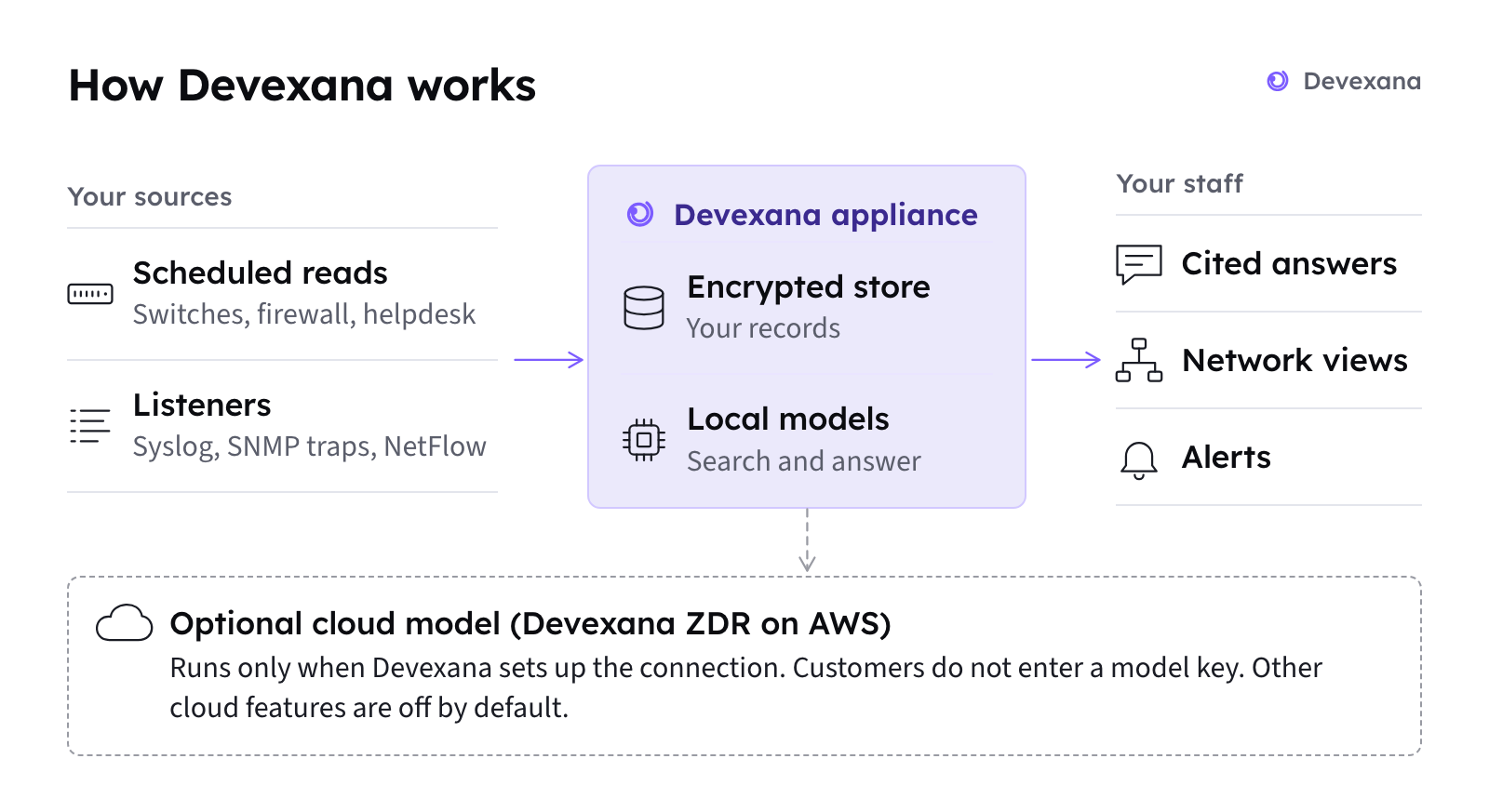
Devexana runs on an appliance on your network. Each control below names the record that it writes.
Summary
Your organization must configure network controls around the appliance. The following software controls apply to release 0.3.182.
- Read-only sources. Configure a read-only account for each source. Devexana rejects a source that declares a write operation when the source loads. Each read function stays off until an administrator approves it.
- Device changes. In this release, Devexana disables changes to network-device configuration in code.
- Where answers are produced. By default, Devexana produces answers with models that run on the appliance. A deployment can run with no cloud model. In production, customers do not bring their own model keys. If a deployment uses a cloud model, Devexana provides it through Devexana's zero-data-retention (ZDR) agreement on AWS. The optional networking assistant uses a cloud model only when Devexana has set up the cloud connection for that deployment. Other cloud features are off by default. Devexana records each networking assistant request in the egress log on the appliance. Outbound connections: the complete list lists every outbound connection and its records.
- Outbound connections. The Devexana service checks each outbound TCP connection that it makes. The Devexana service refuses public-address connections unless they reach a source you added or a feature you turned on.
- Encryption at rest. Devexana encrypts the database with SQLCipher and encrypts backups. Devexana does not encrypt the local search-index file. Protect it with full-disk encryption.
- Audit log. Devexana records sign-ins, reads, approvals and changes in a hash-chained, append-only audit log. The appliance checks the chain at start-up. Outbound logging depends on the feature (Outbound connections: the complete list). The audit log does not provide a complete record of network traffic. DNS lookups and operating-system traffic are outside its coverage.
- Updates. Devexana verifies update signatures before installation. If the service fails its health check after an update, Devexana automatically restores the previous code.
Controls and where they are recorded
| Control | What it does | Where it is recorded | Details |
|---|---|---|---|
| Read-only sources and read approval | Rejects a source that declares a write. Keeps each read function off until an administrator approves it. Switch commands must pass a read-only command allowlist | Approvals in the audit log | Read-only sources |
| Device-change lock | Refuses changes to network-device configuration in this release. The lock is in code, not a setting. It also refuses writes from the device consoles | Each refusal in the audit log | Change proposals and human approval |
| Egress guard | Checks each outbound TCP connection from the Devexana service. Refuses public addresses unless a source or a feature you turned on holds a grant | Blocked attempts in the egress log | Outbound connections: the complete list |
| Models on the appliance and cloud settings | Produces answers with local models. Each cloud feature has its own setting | Logging varies by feature. See Outbound connections: the complete list | Where the AI runs |
| Database encryption and stored credentials | Encrypts the database with SQLCipher. Stores source credentials encrypted. Never returns a stored secret through the interface | Each credential read in the audit log | Encryption and credentials |
| Accounts, roles and lockout | Hashes passwords and session tokens. Locks an account after repeated failed sign-ins. Four built-in roles limit access | Sign-ins, failed sign-ins, lockouts and role changes in the audit log | Accounts, roles and sign-in |
| Audit log and evidence pack | Chains each audit row to the previous row by hash. Refuses updates and deletes of recorded rows | The audit log and the egress log; the evidence pack download | The audit log, Audit log and the auditor evidence pack |
| Signed updates | Verifies the signature of each update before installation. Rolls back the code if the health check fails | Update checks in the egress log and the audit log | How Devexana is delivered |
| Daily encrypted backups | Takes a verified, encrypted database snapshot each day and keeps 14 | Backup events in the audit log | How Devexana is delivered |
| Web interface protections | Sends security headers with each page. Limits the rate of sign-in attempts per address. Shows a system-use notice that each user accepts before any data is shown | Failed sign-ins in the audit log | Accounts, roles and sign-in |
What Devexana enforces and what you configure
Devexana enforces controls inside its own service. Your organization controls the network, the operating system around the service and the physical appliance.
| Devexana enforces | You configure |
|---|---|
| The egress guard on outbound TCP from the Devexana service | Outbound rules at your firewall, and placement of the appliance on a management network |
| Read-only enforcement on each source | Read-only accounts on each device and system. Restrict each account on the device side as well |
| SQLCipher encryption of the database and backups | Full-disk encryption on the appliance, and physical security of the appliance |
| Security headers on the web interface | Agreement with Devexana on HTTPS for the web interface and its certificates (How Devexana is delivered) |
| The hash chain on the audit log and the egress log | A copy of the chain head kept outside the appliance (Audit log and the auditor evidence pack) |
| A separate setting for each cloud feature | Whether your deployment uses a cloud model. If it does, Devexana sets up the connection. You do not enter a model key |
Network exposure
The appliance accepts inbound connections on the web interface. It also accepts inbound connections on each listener and webhook that an administrator turns on.
| Inbound surface | Default | Recommended control |
|---|---|---|
| Web interface | On | Allow access only from your IT subnet. Devexana sets up HTTPS for the web interface during installation (How Devexana is delivered) |
| Receive-only listeners for syslog, SNMP traps and NetFlow | Off | Allow only your devices to reach the listener ports. List the sender address ranges in the listener settings (Syslog, SNMP traps and NetFlow) |
| Webhooks from a helpdesk or monitoring system | Off | Turn on only the webhooks you use. Allow only the sending system to reach the appliance |
Port numbers are on Ports and protocols. Placement requirements are on How Devexana is delivered.
Vendor access and updates
The Government/Education edition has no remote-access feature. In the Business edition, WireGuard remote access exists, and an administrator turns it on. The vendor support channel is off by default.
Agree in writing with Devexana how updates reach your appliance and who holds operating-system access to it. See How Devexana is delivered for update signing and rollback.
Telemetry
The product contains no third-party telemetry. An administrator can enable a signed heartbeat to Devexana Cloud. It includes software version, edition, resource use, load, uptime, model names and source counts. An administrator can preview the payload before enabling the heartbeat. Devexana records each send in the egress log.
Known limits
The full list of product limits is on What Devexana does not do (limitations).
Report a security issue
Send security reports to security@devexana.com. The same address is in the security.txt file of this website.
Applies to Devexana release 0.3.182. Page updated 2026-10-20. Questions or corrections: support@devexana.com.