
Encryption and credentials
Devexana encrypts its database and backups. The database key is on the same disk. Ask Devexana to enable full-disk encryption on the appliance.
- Available
- SQLCipher database encryption and encrypted backups
- Available
- Encrypted storage of source credentials on the appliance
On this page
At rest
Devexana encrypts the database with SQLCipher and encrypts backups. Devexana does not encrypt the local search-index file. Protect that file with full-disk encryption and file permissions.
| Data | Protection | What you add |
|---|---|---|
| Database | Encrypted with SQLCipher. The Devexana service refuses to open the database without the key | Full-disk encryption on the appliance |
| Database key | A random key in a file that only the root account can read. The service receives the key at start-up | Physical security of the appliance. Restrict root access |
| Local backups | Daily SQLCipher snapshots that use the same key. The snapshots do not contain the key file or the service configuration file | An encrypted offsite copy to your own S3 bucket, off by default (How Devexana is delivered) |
| Search-index file | Not encrypted by the application. Its backup copy is encrypted | Full-disk encryption on the appliance |
| Offsite backup copy (optional) | Devexana uploads only encrypted snapshot files. Devexana refuses unencrypted data | Access policy and retention rules on your bucket |
Source credentials
Configure a read-only account for each source. Devexana shows the steps to create one. Devexana stores the credential encrypted on the appliance.
- Devexana stores credentials in its encrypted database.
- Devexana never returns a stored secret through its interface.
- Devexana records each read of a stored credential in the audit log.
- Devexana does not log checks that test whether a credential exists without reading it.
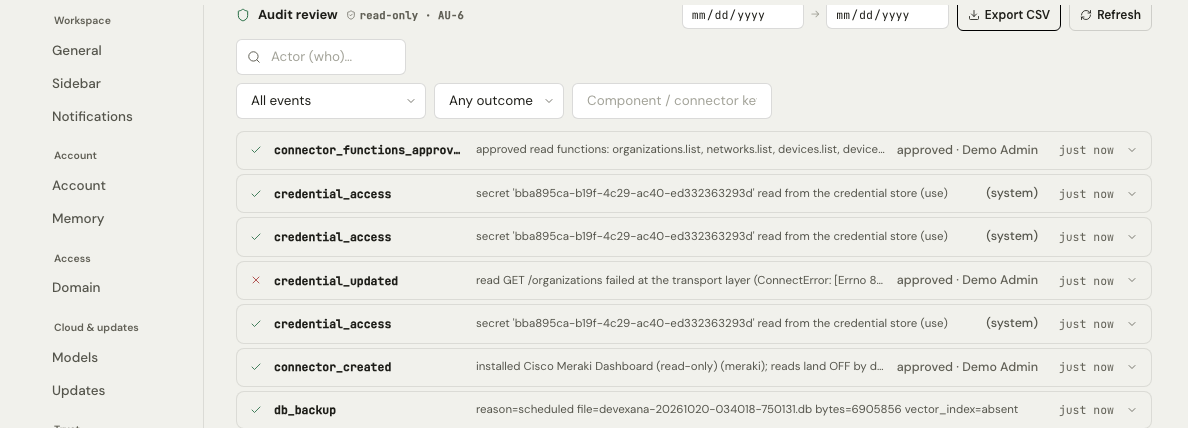
Account setup for each source type is on Create read-only accounts.
Exception: switch discovery settings
For switch discovery, Devexana stores SNMP communities and SNMPv3 keys in the appliance configuration file. These settings are outside the encrypted credential table. The default discovery community is public. Before you run discovery, replace public with your own community or configure an SNMPv3 user.
Secrets in device output
Device output can contain secrets. Devexana masks secrets in device output before it stores the output or sends it to a model. Examples are RADIUS keys, TACACS+ keys, SNMP communities, password hashes and private keys.
In transit
| Connection | Protection |
|---|---|
| SSH to switches and firewalls | On first connection, Devexana trusts the device host key. Devexana pins that key for later connections |
| SNMPv3 | HMAC-SHA authentication and AES-128 privacy |
| Directory reads (LDAP) | LDAPS with certificate validation by default |
| Cloud features and API sources | HTTPS |
| Web interface | HTTPS, set up by Devexana during installation (How Devexana is delivered) |
Key rotation
Devexana supports database key rotation. Rotation ends every session. To plan a rotation, write to support@devexana.com.
Signed updates and the identity of the appliance
Updates use Ed25519 signatures. The appliance verifies each update before installation (How Devexana is delivered).
Applies to Devexana release 0.3.182. Page updated 2026-10-20. Questions or corrections: support@devexana.com.