
Check an answer against its sources
Before you act on an answer or finding, check its claims against the source records. This page explains citation limits and how to report incorrect answers.
- Available
- Citations with freshness on chat answers
- Available
- Citations to device reads in the assistant on a switch page
- Available
- Switch-page refusal of addresses, interfaces and names that are not in the reads
- In production use
- Firewall diagnosis marked as based on the logs
On this page
Answers can link to cited records or an automatically attached source. An automatically attached source does not show which record the model used.
Check an answer in five steps
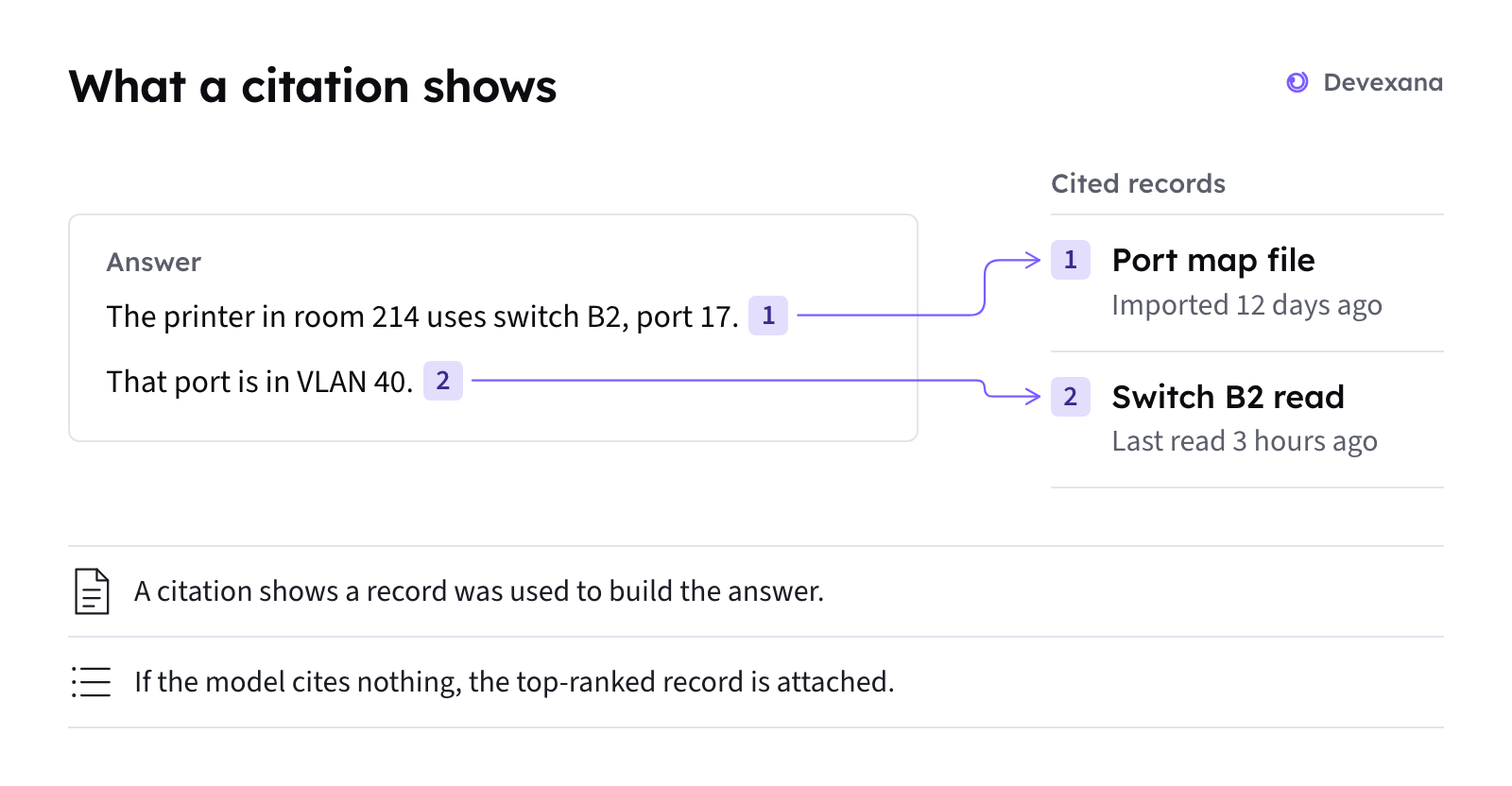
- Open each citation in the answer. Each marker in the text links to a stored record.
- Read the freshness label on each cited record (Data looks stale).
- Read the record. Compare each claim in the answer with the text of the record.
- Read the notes under the answer. A note can say that details were removed, or that the answer is uncertain.
- Before you act, confirm the claim at the source. Use the read-only console or the source system.
What each mark proves
This table describes chat answers. The next section describes checks on answers from the switch-page assistant.
| Mark | What it proves | What it does not prove |
|---|---|---|
| Citation marker provided by the model, for example [1] | The record was used to build the answer | That the record supports the sentence next to the marker |
| Automatically attached source on an answer with no markers | Devexana attached the highest-ranked source record | That the model used the record |
| Cited record in the source list | The answer text points to this record | That every detail in the answer is in the record |
| Related record that is not cited | The record is on the same subject | That the answer used the record |
| Freshness label | When the record was last read or updated, and whether the source deleted it | That the record matches the source system now |
| Note that names or dates were removed | Devexana removed person names or dates that were not in the source records | That the remaining text is correct |
| Note that marks the answer as uncertain | The checks found two or more other details that are not in the records. Devexana marks the answer as uncertain | Which sentence is wrong |
Answers from the assistant on a switch page
On a switch page, the assistant reads the switch with read-only commands first. Then it answers from those reads and cites them.
Read these parts of a switch-page answer:
| Part | What to check |
|---|---|
| Citation numbers in the answer | Each number links to a device read. Open the device read. Compare its value with the answer |
| Sources row | The list of reads that the answer used |
| "Sources disagree" card | Two reads give different values for one item. The card shows both values |
| Reads marked as not run | The assistant lists read functions that did not run. The answer can cover less than the question |
| Last line of the answer | Where the answer was produced: on the appliance, or by a cloud model with its name |
The assistant refuses a draft that names an address, an interface or a person that is not in the reads. Devexana then builds the answer from the read results only. Numbers and dates are not refused. Check them against the device.
Findings and firewall diagnoses
- Security findings start as proposals. A person confirms each finding (Security findings).
- Firewall diagnoses are marked as based on the logs. A diagnosis flags names that are not in the log data (Firewall alerts and the daily brief).
Symptoms
A citation does not seem to support the sentence
What happened
The cited record does not contain the claim in the sentence.
Why
A citation shows that a record was used to build the answer. The model can combine records, or state a claim that no record holds.
What to do
- Open the other citations in the answer.
- Look for the claim in each cited record.
- If no record holds the claim, do not rely on that sentence.
- Ask a narrower question that names the record you need.
If this does not fix it
Report the answer. See the last section of this page.
The answer has one source but no citation markers
What happened
The source list shows one record, but the answer text has no markers.
Why
If the model provides no citations, Devexana attaches the highest-ranked source record. This source shows what was retrieved. It does not show what the model used.
What to do
- Open the attached source.
- Compare the answer with the record.
- Treat each claim that the record does not hold as unchecked.
If this does not fix it
Report the answer. See the last section of this page.
A number or a date in the answer is not in the sources
What happened
The answer gives a number or a date that you cannot find in the cited records.
Why
The checks do not check a single number. On a switch page, numbers and dates are not refused.
What to do
- Look for the number or the date in each cited record.
- If it is not there, read the value in the source system.
- Use the value from the source system.
If this does not fix it
Report the answer. See the last section of this page.
A switch-page answer names a read as not run
What happened
The answer lists one or more reads as not run. The answer covers less than the question.
Why
A required read did not run, or nobody approved it before the prompt expired.
What to do
- Identify the read functions that did not run.
- Ask the question again.
- When the assistant requests approval, approve the required read functions.
If this does not fix it
Read A switch is listed but not read. The switch can be unreachable, or its reads can be refused.
Two sources disagree
What happened
The answer shows a "Sources disagree" card with two values.
Why
Two records give different values for the same port or device, for example two port assignments.
What to do
- Read the freshness of each record.
- Read the value in each source system.
- Confirm the correct value with the administrator responsible for the source system.
- If Devexana's stored record is stale, select Sync now for that source on the Connectors page.
If this does not fix it
Send an email to support@devexana.com. Include the port or device, the two values and the two source names.
Report a wrong answer
Send a wrong-answer report to your administrator or support@devexana.com.
- Copy the question and the full answer.
- Write the title and the freshness of each cited record.
- Write the date and the time that you asked.
- Write the correct answer and where you found it.
- Send the report to your administrator or support@devexana.com.
Applies to Devexana release 0.3.182. Page updated 2026-10-20. Questions or corrections: support@devexana.com.