
Where the AI runs
By default, models on the appliance produce answers. If a deployment uses a cloud model, Devexana provides it through its zero-data-retention agreement on AWS.
- In production use
- Language models that run on the appliance: answer model, embedding model and reranker
- Off by default
- Networking assistant cloud model through the Devexana zero-data-retention agreement on AWS. It runs only when Devexana sets up the cloud connection. It then sends questions and device context with no approval for each request
- Off by default
- Cloud consultant, escalation, cloud agent features and web search
On this page
By default, Devexana produces answers with models that run on the appliance. A deployment can run with no cloud model. In production, customers do not bring their own model keys. If a deployment uses a cloud model, Devexana provides it through Devexana's zero-data-retention (ZDR) agreement on AWS. Devexana sets up and turns on that connection. A customer administrator does not enter a key.
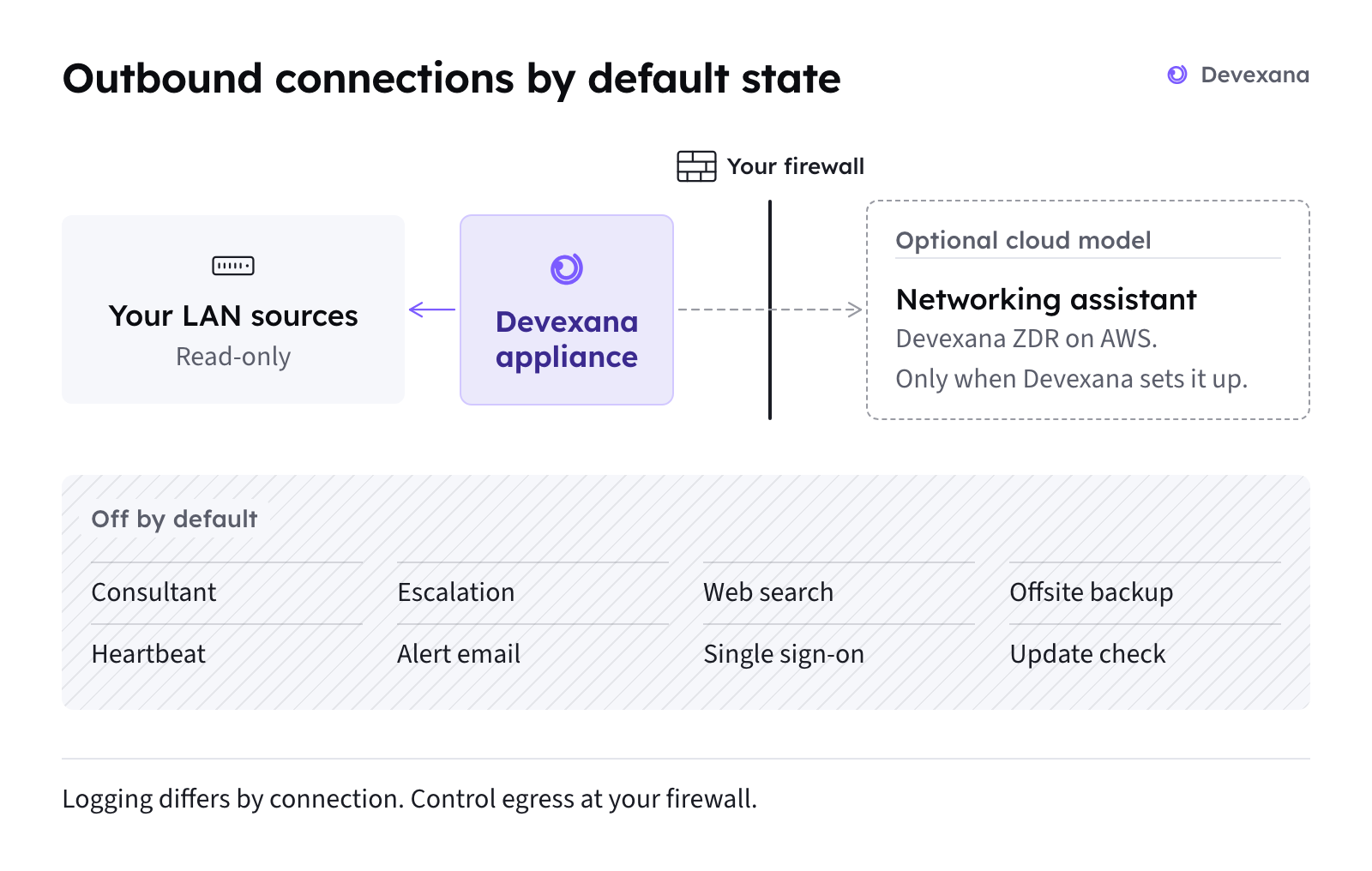
Cloud features other than the networking assistant are off by default. Devexana records each networking assistant request in the egress log on the appliance. Outbound connections: the complete list describes outbound connections and their recording limits.
The short answer
| Subject | Fact |
|---|---|
| Where answers are written | By default, the answer model on the appliance writes answers. A deployment can run with no cloud model |
| Where a cloud model comes from | In production, Devexana provides any cloud model through Devexana's zero-data-retention (ZDR) agreement on AWS. Customers do not bring their own model keys |
| The networking assistant | The assistant on a switch page. It uses a cloud model only when Devexana has set up the cloud connection for the deployment |
| Prompt before a networking assistant send | None. When the cloud connection is set up, the networking assistant sends without a prompt for each request |
| Other optional cloud features | The cloud consultant, escalation, cloud agent features and web search. Each is off by default |
| Effect of the edition | None. Each cloud feature has its own setting in both editions |
| Where cloud sends are recorded | Not every cloud request is recorded. Optional cloud features lists the recording locations and gaps |
Models on the appliance
By default, llama.cpp serves the Qwen 3.6 35B-A3B answer model on the appliance. An embedding model and a reranker also run on the appliance.
| Model | What it does |
|---|---|
| Answer model: Qwen 3.6 35B-A3B | Writes answers on the appliance by default |
| Embedding model (768 dimensions) | Turns records and questions into vectors for search by meaning |
| Reranker | Puts the search results in order before the answer model reads them |
- llama.cpp serves the models, and llama-swap loads and unloads them.
- The model engine listens on the appliance's loopback address only.
- The shipped models do not read images and do not take speech input.
- The answer model reads your stored records when you ask a question. Devexana does not train the models on your data.
Features that use the local models
These features use only the models on the appliance:
- Chat answers.
- Questions in Brain.
- The assistant on a switch page, when Devexana has not set up a cloud connection.
- Firewall alert diagnosis and the text of the daily brief.
- Insights narration (Business edition).
For the daily brief, Devexana code detects alerts and calculates the facts. The model on the appliance writes the text from those facts.
When the model engine is down
If the model engine does not respond, the answer starts with "Can't reach the on-box model engine". Devexana assigns this answer a confidence of zero. Follow the steps in “Can't reach the on-box model engine”.
The model engine writes one answer at a time. Questions from people go before background work, such as the daily brief.
Optional cloud features
In production, Devexana provides every cloud model in this section through Devexana's zero-data-retention (ZDR) agreement on AWS. Customers do not bring their own model keys. Each optional cloud feature has its own default and payload.
| Feature | Default | What it sends |
|---|---|---|
| Networking assistant (the assistant on a switch page) | Runs only when Devexana sets up the cloud connection for the deployment | The networking question and device context. Device context can include configuration and command output, with device secrets masked |
| Cloud consultant | Off | The question, plus the titles and problem text of up to five matching records, after redaction |
| Escalation | Off | The question, the local answer's confidence and the open unknowns, after redaction. Never the stored records |
| Automatic escalation and cloud agent features | Off | The question and tool results, after redaction |
| Agent command-line transport | Off | A redacted payload |
| Agent SDK transport | Off | Tool results after redaction |
| Web search | Off | The search query, after redaction |
Approval and logging differ by feature. The table identifies automatic requests and requests that the egress log does not record.
| Feature | How a send is approved | Where the send is recorded |
|---|---|---|
| Networking assistant | No prompt for each send | Egress log and audit log. The egress log keeps the size and a hash of the request, not its text |
| Cloud consultant | A person consents for each question | Egress log and audit log |
| Escalation | A person previews and approves each send | Egress log and audit log |
| Automatic escalation and cloud agent features | A setting for each feature. Automatic escalation removes the prompt for each send on eligible questions | Egress log and audit log |
| Agent command-line transport | Its own settings, all off by default | Audit log and egress log |
| Agent SDK transport | Its own settings, all off by default | Audit log, one row for each turn |
| Web search | The person sees the query and confirms each search | Audit log |
Edition and cloud
Each cloud feature has its own setting in both editions. The Government/Education edition does not block cloud features. Editions compares the editions.
What is removed before a cloud send
Redaction depends on the feature and provider route.
| Feature | What Devexana removes before the send | Exception |
|---|---|---|
| Cloud consultant, escalation, cloud agent features, web search | Addresses, MAC addresses, email addresses, host names, account names, person names and inventory names. Devexana replaces each one with a placeholder. A detected secret blocks the send. An error in the redaction step also blocks the send | For the cloud consultant and escalation on routes marked for zero data retention, the default setting allows identifiers through. A detected secret still blocks the send |
| Networking assistant | Device secrets only: RADIUS and TACACS+ keys, SNMP communities, password hashes and private keys | None. The networking assistant does not replace addresses or host names |
Zero-data-retention agreement
In production, Devexana provides any cloud model through Devexana's zero-data-retention (ZDR) agreement on AWS. Devexana sets up and turns on that connection. Customers do not bring their own model keys. This page does not state the terms of that agreement.
Keep all AI on the appliance
A deployment can run with no cloud model. There is no single setting that turns off every cloud feature. To keep all AI on the appliance, do the steps below.
- Contact support@devexana.com.
- Ask Devexana to confirm that no cloud model connection is set up for your appliance.
- If a cloud model connection is set up, ask Devexana to turn it off.
- Keep the cloud consultant setting off.
- Keep the escalation settings off.
- Keep the cloud agent settings off, including the command-line and SDK transports.
- Keep web search off.
- On your firewall, block cloud AI and web-search connections from the appliance.
- Use Outbound connections: the complete list to identify the destinations.
- Open Settings › Trust › Egress log.
- Check for cloud sends recorded after these changes.
- Open Settings › Trust › Access audit.
- Check for cloud sends recorded after these changes.
Limits
Outbound connections: the complete list lists the outbound connections and their defaults. Audit log and the auditor evidence pack shows how to export the egress log.
Applies to Devexana release 0.3.182. Page updated 2026-10-20. Questions or corrections: support@devexana.com.