
Ports and protocols
This page lists the ports the appliance listens on and the ports it connects to. Use it to write firewall rules for the appliance.
- Off by default
- Syslog, SNMP trap and NetFlow listeners
On this page
The syslog, SNMP trap and NetFlow/IPFIX listeners are off by default. When an administrator turns a listener on, it binds to the loopback address until an administrator sets a LAN address.
Inbound to the appliance
| Port | Protocol | Service | Default | Notes |
|---|---|---|---|---|
| TCP 42108 | HTTP | Web interface and API | Set by Devexana during installation. | Devexana refuses a public bind address. |
| HTTPS port (depends on installation) | HTTPS | Web interface through a TLS front service | Set up by Devexana during installation. | A TLS front service serves HTTPS. Port 42108 itself does not terminate TLS. See How Devexana is delivered. |
| UDP 514 | Syslog (RFC 3164 and 5424) | Syslog listener | Off. Bound to the loopback address. | TCP 514 is an option. It is also off by default. |
| UDP 162 | SNMP traps (v1, v2c) | Trap listener | Off. Bound to the loopback address. | Devexana does not decode SNMPv3 trap contents. |
| UDP 2055 | NetFlow v5 and v9, IPFIX | Flow listener | Off. Bound to the loopback address. | Devexana does not decode sFlow. |
| UDP 5353 | mDNS | Appliance name on the LAN | Set up during installation. | Publishes a .local name for the appliance. |
Webhook receivers for PRTG, Freshservice and switches use TCP 42108. Each receiver is off by default and needs its own shared secret.
Ports below 1024 for listeners
The Devexana service does not run as root. If a listener cannot open port 514 or 162, select a port above 1024. Configure your devices to send to that port. For example, use UDP 9514 for syslog and UDP 9162 for traps. See A listener receives nothing.
Loopback only
| Port | Service | Notes |
|---|---|---|
| TCP 8080 | Model server | Listens on the loopback address only. It is not reachable from the LAN. |
Outbound from the appliance to your network
Each source has its own address and port field. The table shows the default when the field is empty.
| Port | Protocol | Used for | Default |
|---|---|---|---|
| TCP 22 | SSH | Switch, router and firewall reads; the read-only console | Port 22. You can set another port for each source. |
| UDP 161 | SNMP v2c and v3, GET and GETNEXT only | Switch reads and switch discovery | Port 161. You can set another port for each source. |
| TCP 443 | HTTPS | REST and SOAP API sources. Freshservice: in production use. Meraki and PRTG: available. See Sources and support tiers | The port in the address that you enter. |
| TCP 636 | LDAPS | LDAP and Active Directory | Port 636 for LDAPS. StartTLS uses TCP 389. |
| Driver port | NAPALM getters | Switch reads with the napalm transport | The port that the NAPALM driver uses for that operating system. Check the driver documentation. |
| Database port | SQL | Generic SQL database source | The port of your database. |
Discovery probes
Discovery is optional. During discovery, Devexana performs the checks in this table. The ARP cache check reads the appliance's local neighbour table. Ranges are limited to /22.
| Probe | Ports |
|---|---|
| TCP connection check | 21, 22, 23, 80, 135, 139, 443, 445, 515, 548, 554, 631, 2049, 3389, 5000, 5060, 8000, 8080, 8443, 8888, 9100 |
| ICMP ping | Not applicable |
| ARP cache read | None. Devexana reads the appliance's own neighbour table. |
| SNMP identity read | UDP 161. By default, discovery tries the community public. The list of communities is an appliance setting |
| TLS certificate read | TCP 443 |
See Switch discovery.
Outbound to the internet
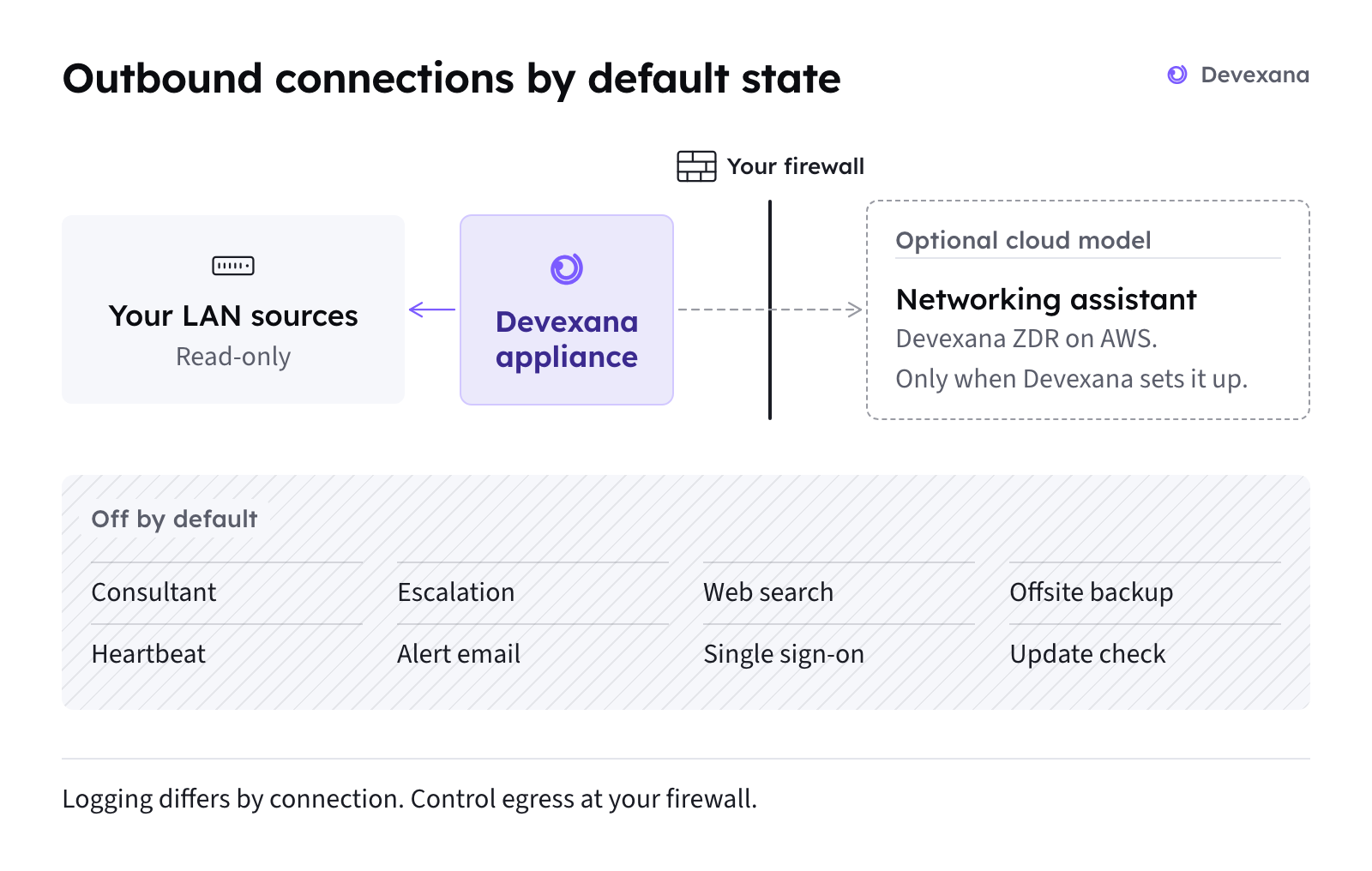
By default, Devexana produces answers with models that run on the appliance. A deployment can run with no cloud model. In production, customers do not bring their own model keys. If a deployment uses a cloud model, Devexana provides it through Devexana's zero-data-retention (ZDR) agreement on AWS. The optional networking assistant uses a cloud model only when Devexana has set up the cloud connection for that deployment. Other cloud features are off by default. Devexana records each networking assistant request in the appliance's egress log. See Outbound connections: the complete list for outbound destinations, defaults and logging details.
| Port | Protocol | Destination | Default | Notes |
|---|---|---|---|---|
| TCP 443 | HTTPS | The Devexana-managed AWS endpoint for the optional cloud model | Off until Devexana sets up the cloud connection | Used only if your deployment uses a cloud model. Customers do not enter a model key. Devexana records each networking assistant request in the egress log |
This table lists the cloud model connection only. Outbound connections: the complete list lists the other outbound connections.
Applies to Devexana release 0.3.182. Page updated 2026-10-20. Questions or corrections: support@devexana.com.