
API connectors and ticketing
Devexana reads ticketing software, firewalls, directories, monitoring tools and network controllers through their APIs with a read-only account. This page explains how to connect one.
- In production use
- Barracuda CloudGen over SSH and syslog; Freshservice
- Available
- ServiceNow, Lansweeper, Meraki, Catalyst Center, Aruba Central, Aruba Instant, ClearPass, Sophos Firewall, Cisco CUCM, PRTG, LDAP and Active Directory, Microsoft Entra ID, Barracuda CloudGen REST
On this page
Devexana connects to an application or appliance through its API with a read-only account. It reads records on a schedule, keeps them on the appliance and cites them in answers.
How API access works
Each API connection is one source. A source uses one account that the application owner creates for Devexana.
| Part | What it is |
|---|---|
| Account | A read-only integration user, API key, API token or app registration on the application |
| Transport | Read requests to the application's API over HTTPS. Directory sources use LDAPS or Microsoft Graph |
| Without a usable API | A read-only SSH session that runs a fixed batch of allowlisted read commands, as with Barracuda CloudGen |
| Logs | Optional. The application sends syslog to a receive-only listener on the appliance. See Syslog, SNMP traps and NetFlow |
| Credential | Stored encrypted on the appliance. Each read of the credential writes a record to the audit log |
After a successful connection test, the appliance allows connections to the application host. For HTTPS connections, allow TCP 443 from the appliance to the application host.
What Devexana does with a source
- Devexana reads the approved record types on a schedule. The default interval for API sources is 15 minutes.
- Devexana stores the records on the appliance.
- Devexana links the records to network devices, people, ports and tickets where the data allows it.
- Devexana cites the records in answers, with the time of the last read.
If a read fails, the next read starts from the last successful point. The Connectors page shows the health state of each source. See Source health states.
What Devexana does not do
Sources only read. If a source declares a write operation, Devexana rejects that source when it loads.
Ticketing and service desks
A ticketing source gives Devexana the history of your service desk. Devexana reads it through a read-only integration user or an API token.
| Record | What Devexana does with it |
|---|---|
| Tickets and service requests, with their dates | Cites them in answers next to the switch, port, person or site that they concern |
| Ticket conversations | Keeps the history of each ticket for search and citation |
| Assets and configuration items | Links them to network devices, people and ports |
| Requesters, agents and locations | Builds the directory of people and the list of sites |
| Solution and knowledge articles | Makes them searchable and citable |
Devexana reads changes on the schedule. It does not read ticket attachments, and it does not reply to, update or close tickets.
| Example product | Setup |
|---|---|
| Freshservice | Add it in the Add connector wizard with the API key of a read-only agent |
| ServiceNow | Supported. Devexana sets up the connector for your instance during onboarding |
| Lansweeper | A read-only account for its helpdesk API, or a read-only SQL login |
![Chat answer to a question about a council-chamber projector. The answer cites one helpdesk ticket as [1], and the ticket card shows its date and an updated today label.](/docs/assets/shots/chat-citations.png)
Other API connectors
The same API access works for each category below. Supported vendors and protocols gives the connection method and availability of each product.
| Category | Example products | What Devexana reads |
|---|---|---|
| Firewalls | Barracuda CloudGen, Sophos Firewall | Interfaces, routes, high-availability state, licences, zones and rules where the API returns them. Logs arrive through syslog |
| Directories | LDAP and Active Directory, Microsoft Entra ID | People, computers, groups, devices and directory roles |
| Monitoring tools | PRTG | Devices, groups, sensors and sensor details |
| Network controllers | Cisco Meraki, Cisco Catalyst Center, HPE Aruba Central, Aruba Instant | Access points, wireless controllers, switches, clients, uplinks, sites and events |
| Access control | Aruba ClearPass | Endpoints, network devices, roles, services, sessions and authentication events |
| Voice | Cisco Unified Communications Manager | Phones, device pools and registrations |
Devexana does not read a product that is not on Supported vendors and protocols.
Access to ask your application owner for
Give the application owner this list before you add the source.
- A dedicated integration user or app registration for Devexana.
- The lowest role that can view the record types you need. The role must not be able to change data.
- An API key, an API token, or a client ID and client secret for that account.
- The address of the API that the appliance can reach.
- For an appliance without a usable API, a read-only SSH account and its host key fingerprint.
Create read-only accounts gives the account type and minimum access for each source.
Add a source
- Open the Connectors screen.
- Select Add connector.
- In Choose a source, select the application.
- In Provision access, compare the account steps with the access that you received.
- In Connect, type the address of the application.
- Enter the read-only credential.
- Select Test connection.
- If the test succeeds, select Connect.
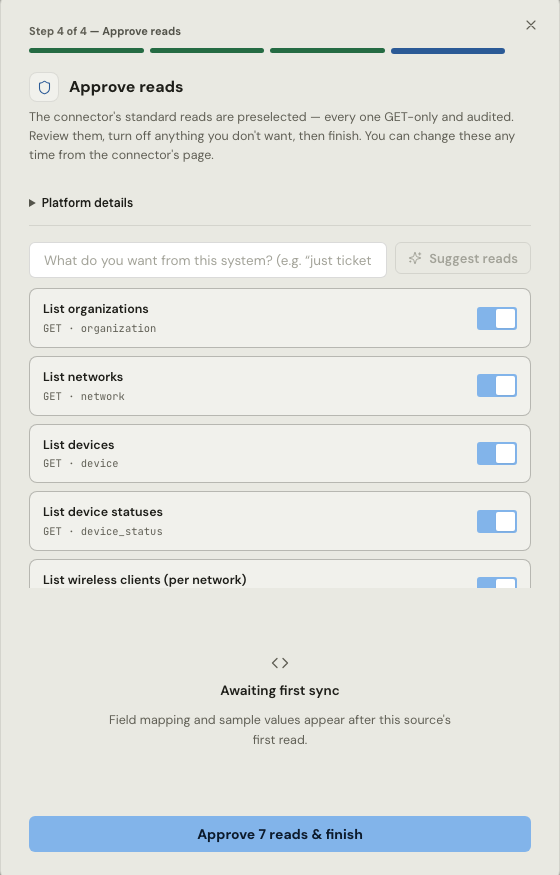
- In Approve reads, review the preselected read functions.
- Turn off each read function that you do not need.
- Select the Approve … reads & finish button.
No read function runs before an administrator approves it. Devexana records the approval in the audit log.
Check that the source works
- Open the source on the Connectors page.
- Make sure that the health state is healthy.
- Make sure that the last read occurred within the source's configured read interval.
- In the records section, make sure that each record type shows a count.
- Ask a question about a record from the application.
- Open the citation.
- Compare the citation with the record in the application.
If the source does not show healthy, select Sync now. If the state does not change, follow Source health states.
Remove a source
- Open the source on the Connectors page.
- Select Remove connector.
- Select Yes, remove.
Devexana stops every read and deletes the credential from the appliance. The audit history stays. The records that Devexana already read stay on the appliance. Delete the account in the application when you no longer need it.
Applies to Devexana release 0.3.182. Page updated 2026-10-20. Questions or corrections: support@devexana.com.