
Audit log and the auditor evidence pack
View, verify and export the audit log and the egress log. Download the evidence pack and retain an external copy.
- In production use
- Audit log and egress log, with the hash chain checked at start-up
- Available
- Evidence pack, chain verification and CSV export
- Off by default
- SIEM forwarding of audit events
On this page
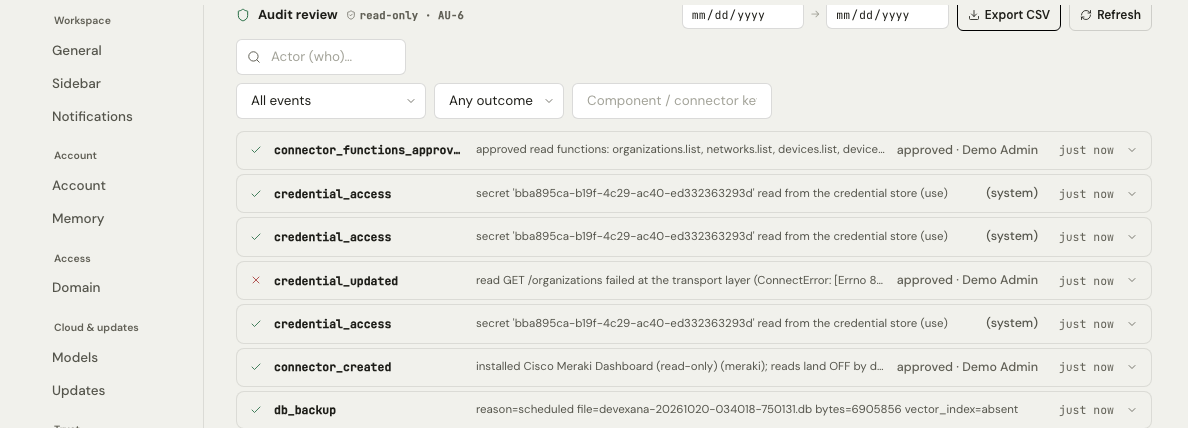
Devexana keeps two hash-chained logs on the appliance: the audit log and the egress log. Auditors view and export both logs in Settings › Trust. They also download the evidence pack there.
Who can see the logs
The Auditor role and the Full access role can view, verify and export the audit log and the egress log. The Auditor role cannot read other data (Accounts, roles and sign-in).
Where the logs are
| Log | Location in Devexana | What it records |
|---|---|---|
| Audit log | Settings › Trust › Access audit | Sign-ins and failed sign-ins, lockouts, role and settings changes, credential reads, source approvals, cloud sends, refused device changes, backups and evidence-pack downloads |
| Egress log | Settings › Trust › Egress log | Each send by the cloud features that write to it, and each outbound attempt that the egress guard blocked (Outbound connections: the complete list) |
How the chain works
Each record stores a SHA-256 hash of its own content and the previous record. Database triggers reject updates and deletions of stored records. At start-up, the appliance recomputes the chain. Without the operating-system override, it refuses to start if the chain is broken.
The table shows three example records with shortened hashes.
| Record | Previous hash | Record hash |
|---|---|---|
| 1041 | 9a04…e71b | 3f8d…12c4 |
| 1042 | 3f8d…12c4 | b62a…0f97 |
| 1043 | b62a…0f97 | 51ce…d803 |
Read down the table. Each record's previous hash matches the record hash of the record above it. The signed checkpoint covers the chain head. Keep the evidence pack outside the appliance.
The full description of the chain is on The audit log.
Verify the chain
The appliance recomputes every hash and identifies the first record with a hash mismatch.
- Open Settings › Trust › Access audit.
- Select Generate evidence pack.
- Read the chain status in the summary. It shows "chain verified" or "CHAIN BROKEN".
- If the status is "CHAIN BROKEN", open the audit integrity section of the downloaded file.
The audit integrity section identifies the first record with a hash mismatch.
The egress guard self-test in Settings › Trust › Egress log also verifies both chains. Its result shows the current chain head of the audit log.
Export the logs
To export a log as CSV, do these steps:
- Open Settings › Trust › Access audit or Settings › Trust › Egress log.
- Set the filters.
- Set the date range.
- Select Export CSV.
Devexana can also forward its own audit events to a SIEM as CEF or JSON over syslog or HTTP. This is off by default. Devexana does not read data from a SIEM.
The evidence pack
Auditors can download one evidence pack with the role matrix, access grants, an OSCAL package and the audit-chain integrity result. The pack is one JSON file. Devexana assembles it on the appliance.
| Main section of the pack | Contents |
|---|---|
| Roles | Each built-in role, what it can do, and the accounts that hold it |
| Access grants | Active grants of a role for a limited scope |
| Settings change history | For each setting, who changed it last |
| Audit integrity | The result of chain verification, the chain heads and the signed checkpoints |
| Egress posture | The results of the egress guard self-test and the receive-only listener self-test, and the deployment mode |
| OSCAL package | A machine-readable control package in OSCAL format |
The appliance records each evidence-pack download in the audit log.
Editions
OSCAL export and scheduled audit reports have their own screens only in the Business edition, under Insights. In the Government/Education edition, the OSCAL package is in the evidence pack. Edition differences are on Editions.
Keep a copy outside the appliance
Keep scheduled copies of the evidence pack outside the appliance. These files preserve earlier chain heads.
- Generate the evidence pack on a fixed schedule, for example each week.
- Store each file on a system that the appliance administrators cannot change.
Different chain heads alone do not establish whether someone changed earlier records.
Retention
Devexana does not delete audit records. The appliance records and refuses requests to delete audit records. The logs grow for the life of the appliance. Retention defaults for other data are on Data retention defaults.
Applies to Devexana release 0.3.182. Page updated 2026-10-20. Questions or corrections: support@devexana.com.