
What Devexana is
Devexana runs on an appliance on your network and answers staff questions with citations. In this release, Devexana does not change network-device configuration.
- In production use
- Freshservice helpdesk reads; Aruba/HP AOS-S (ProCurve) switch reads over SSH and SNMP; Barracuda CloudGen reads over SSH, firewall syslog alerts and the daily brief; language models on the appliance; audit log
- Available
- Cited answers in chat
On this page
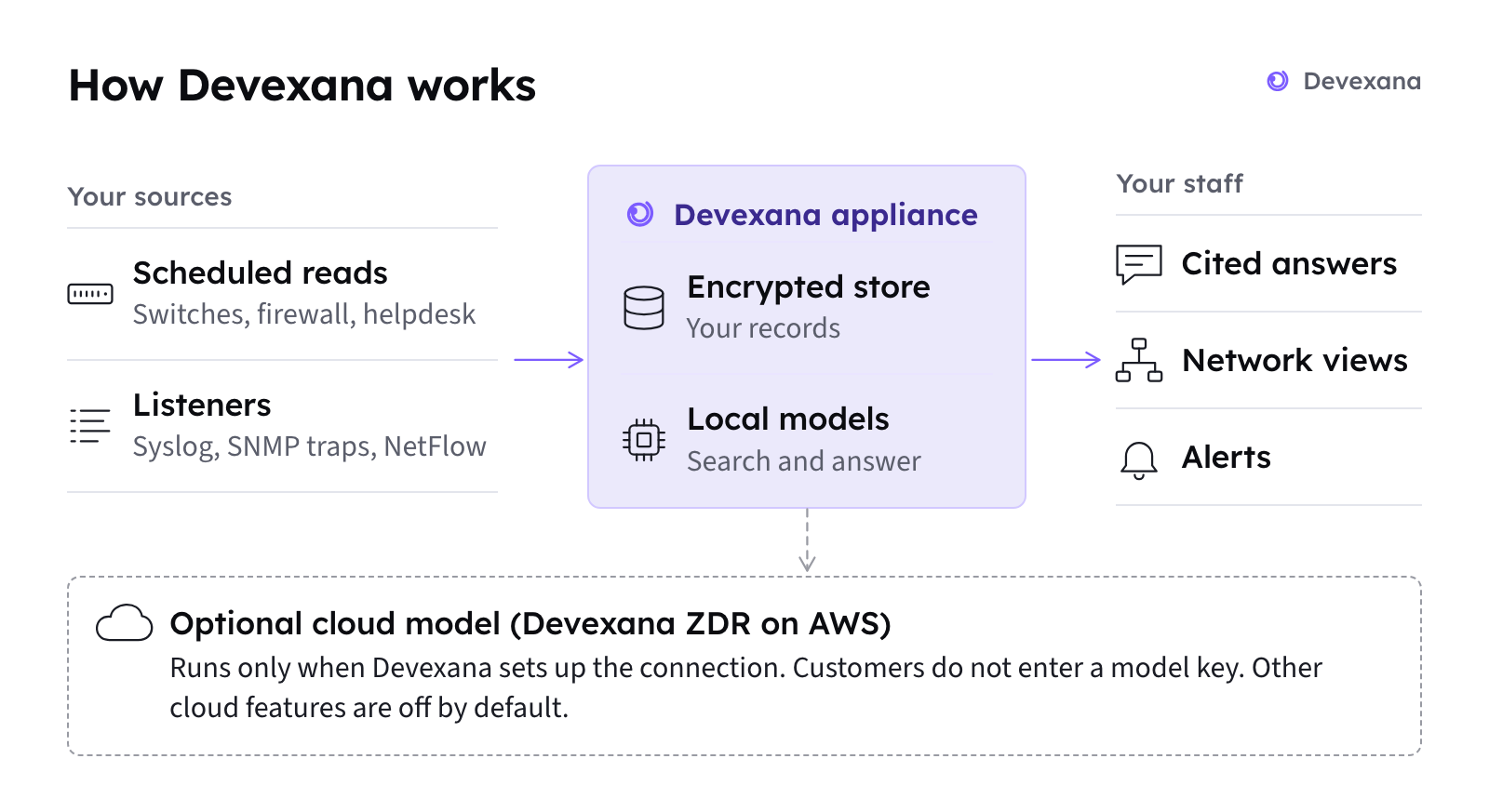
Devexana reads data from your helpdesk, network switches and firewall. It keeps that data in one encrypted database on the appliance.
The appliance
The appliance is an NVIDIA DGX Spark computer that you place on your network. Devexana and its language models run on it.
- Devexana reads your helpdesk, switches and firewall through read-only sources.
- Devexana stores what it reads in one encrypted database on the appliance.
- Your staff use Devexana in a web browser on the local network.
How it works shows each step from a source system to an answer.
What your staff can do
| Task | What Devexana gives you | Read more |
|---|---|---|
| Ask a question in plain language | An answer with numbered citations that open the stored records | Ask questions, Cited answers |
| Look at the network | A campus map from your site file, neighbour links from LLDP and CDP data, and switch ports | Network views: campus map and switch faceplate |
| Review firewall alerts | Alerts and a daily brief built from firewall syslog | Firewall alerts and the daily brief |
| Review security findings | Security findings that a person confirms or dismisses | Security findings |
| Run scheduled reports | Routines that produce PDF files on a schedule | Routines (scheduled reports) |
| Give auditors evidence | A view of the audit log, a chain check, and one evidence pack to download | Audit log and the auditor evidence pack |
![Screenshot of the Devexana chat. The question asks how the team fixed a council-chamber projector last time. The answer names the fix and cites one helpdesk ticket as [1], with the badge updated today and the ticket date. The Evidence section repeats the marker after each claim.](/docs/assets/shots/chat-citations.png)
How Devexana treats your systems
Devexana reads your systems through read-only sources. When a source declares a write operation, Devexana rejects it during loading. Each read function stays off until an administrator approves it.
In this release, changes to network-device configuration are disabled in code.
Devexana records sign-ins, setting changes and read-function approvals in hash-chained, append-only logs on the appliance. Records of cloud sends depend on the feature (Outbound connections: the complete list). The audit log describes the logs.
Where the AI runs
By default, Devexana produces answers with models that run on the appliance. A deployment can run with no cloud model. In production, customers do not bring their own model keys. If a deployment uses a cloud model, Devexana provides it through Devexana's zero-data-retention (ZDR) agreement on AWS. The optional networking assistant uses a cloud model only when Devexana has set up the cloud connection for that deployment. Other cloud features are off by default. Devexana records each networking assistant request in the egress log on the appliance.
Where the AI runs lists the models and cloud features. Outbound connections lists outbound connections, their defaults and their log locations.
What Devexana does not do
What Devexana does not do (limitations) lists every limit in one place.
Next steps
- Read How it works to follow a question from source to answer.
- Read Logs, read-only access and evidence for the differences between logs alone and read-only access.
- If you are evaluating a campus deployment, read Evaluating Devexana for a campus network.
- Read Supported vendors and protocols for the support tier of each vendor.
Applies to Devexana release 0.3.182. Page updated 2026-10-20. Questions or corrections: support@devexana.com.