
The audit log
The audit log records access and actions in Devexana. The egress log records data sent to outside systems and blocked outbound connections.
- In production use
- Audit log, egress log and the chain check at start-up
On this page
Devexana records access, approvals and each request by its optional cloud features in hash-chained, append-only logs. At start-up, the appliance checks the chain. Without the operating-system override, the appliance refuses to start if the chain is broken.
Two chained logs
Devexana keeps two logs. Both logs are inside the encrypted database on the appliance.
| Log | What it records | Where to view it |
|---|---|---|
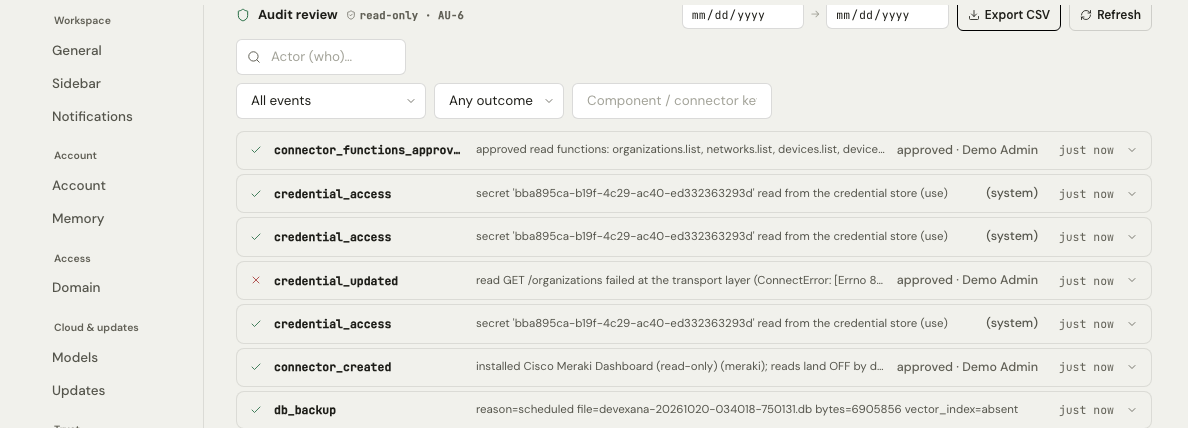
| Audit log | Access to Devexana, approvals, setting changes and refusals | Settings › Trust › Access audit |
| Egress log | Data sent from Devexana to outside systems, and outbound connections that the egress guard blocked | Settings › Trust › Egress log |
What is recorded
The audit log records these events:
- Sign-ins, failed sign-ins and account lockouts.
- Changes to roles and access grants.
- Changes to settings.
- Reads of stored credentials.
- Approvals of read functions.
- Data transmissions by the optional cloud features.
- Every refusal by the device-change lock.
- Use of a kill switch.
- Backups.
- Denied attempts to use a privileged function.
- Requests to delete audit records. Devexana records and refuses each one.
Devexana records scheduled device reads in a command log for each device. Devexana records console commands and assistant commands in the audit log.
How the chain works
Each record stores the hash of the record before it. Changing a hashed field without rebuilding the chain causes a mismatch. Changes to fields outside the hash do not cause this mismatch.
Each record's hash becomes the next record's previous hash. Compare the matching values in adjacent rows. The values shown are shortened.
| Record | Event | Previous hash | Hash |
|---|---|---|---|
| 1041 | Administrator signed in | 9a04…e71b | 3f8d…12c4 |
| 1042 | Read function approved | 3f8d…12c4 | b62a…0f97 |
| 1043 | Setting changed | b62a…0f97 | 51ce…d803 |
The hash of the newest record is the chain head.
- Devexana writes a record to the log.
- A database trigger computes a SHA-256 hash of the record and of the previous hash. The trigger stores the hash in the record.
- Database triggers refuse any update or delete of a recorded audit record.
- At start-up, the appliance computes the whole chain again.
- Without the operating-system override, the appliance refuses to start if any hash does not match.
Deletion requests
Devexana has no function that purges the audit log. Devexana records and refuses each request to delete audit records. The retention setting for the audit log stores a policy note only. It does not delete records.
Outside Devexana, a person with the database key could remove the triggers and rebuild the chain. Neither log has a configured size limit. Data retention defaults lists the retention defaults.
Signed checkpoints
The appliance signs the chain head with an Ed25519 key. This signature is a signed checkpoint.
Limits
View and export the logs
To view either log, open Settings › Trust. For checking and export instructions, see Audit log and the auditor evidence pack.
Applies to Devexana release 0.3.182. Page updated 2026-10-20. Questions or corrections: support@devexana.com.