
Read-only sources
Devexana sources only read your systems. Separate features can write to business systems. In this release, Devexana disables network-device configuration changes in code.
- Available
- Read-only checks on sources, with administrator approval for each read function
- In production use
- Read-only switch reads over SSH and SNMP on Aruba/HP AOS-S (ProCurve) switches
- In production use
- Barracuda CloudGen syslog, received by the syslog listener
- Off by default
- Listeners for syslog, SNMP traps and NetFlow
On this page
The short answer
- Sources only read. When a source loads, Devexana rejects it if it declares a write operation.
- Each read function needs approval. Each read function stays off until an administrator approves it.
- Switch commands pass an allowlist. Devexana sends a switch only commands that pass a read-only command allowlist.
- Network-device changes are locked. In this release, changes to network-device configuration are disabled in code.
- Sources need read access only. Give each source a read-only account. Do not give a source account permission to change configuration.
- Business-system writes are separate. The What can write table lists the business-system writes and their defaults. None of them can change network-device configuration.
Access that Devexana needs
| System | Account to create | Network path from the appliance |
|---|---|---|
| Switches and routers | An SSH account with a read-only role, an SNMPv2c read-only community, or an SNMPv3 read-only user | SSH (TCP 22) and SNMP (UDP 161) |
| Barracuda CloudGen firewall | An SSH account with the fewest rights that allow the read commands | SSH (TCP 22) |
| Helpdesk, monitoring and other API systems | A read-only API key or token | HTTPS |
| Directory | A read-only LDAPS bind, or Entra ID application credentials with read permissions | LDAPS (TCP 636) or HTTPS |
| Syslog, SNMP traps and NetFlow | None. Devices send to a listener on the appliance | Inbound to the appliance only |
Create read-only accounts gives the steps for each account. Devexana stores each credential encrypted on the appliance.
Checks on the read path
Each type of source has its own guard. Devexana checks API source declarations and requires administrator approval for each read function. Switch and firewall reads over SSH and SNMP pass the command guard for their transport. Directory sources use a read-only bind. A read that fails a check does not leave the appliance.
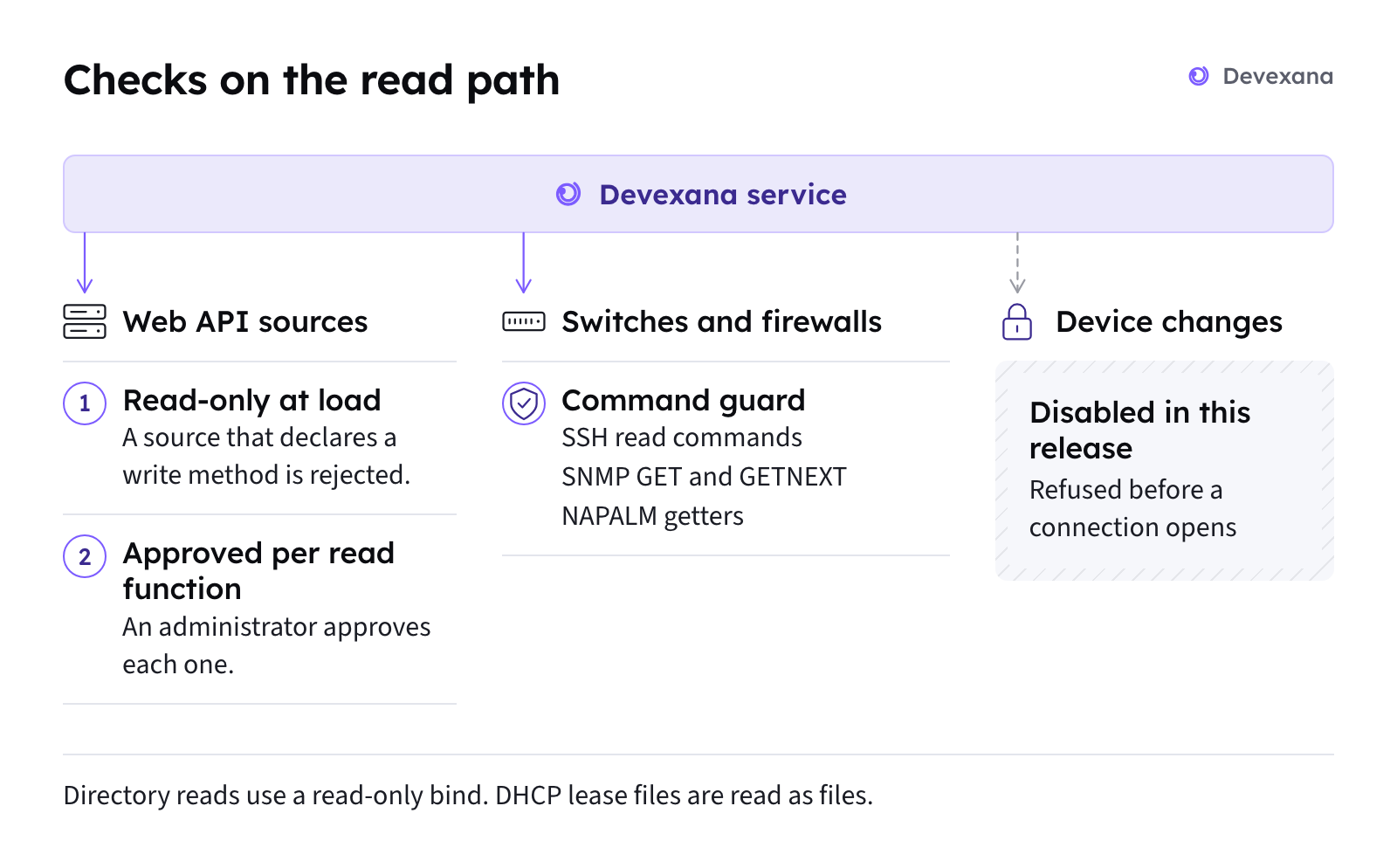
- Each source must declare itself read-only when it loads (API sources). Devexana rejects a source that declares any HTTP method other than GET, HEAD or OPTIONS. It also rejects a read function whose name contains a write verb.
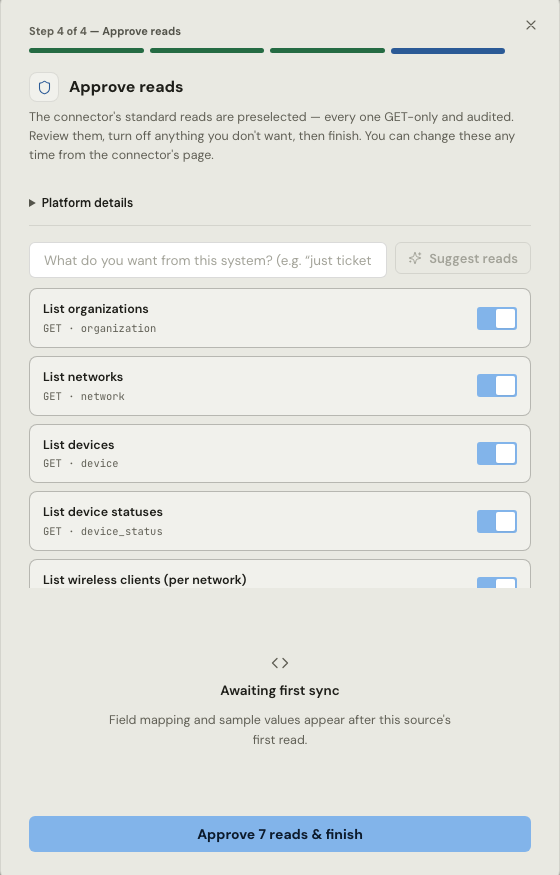
- An administrator approves each read function (API sources). Every read function starts off. An administrator approves the read functions in the last step of adding a source, or later on the source's page. Devexana records the approval in the audit log. The approval path cannot approve a write. Switch, firewall SSH, directory and DHCP lease file sources have no read functions to approve. An administrator adds the source, and the guard for its transport limits what it reads.
- Devexana checks each command (switch and firewall reads). Devexana checks each command before it leaves the appliance. Each transport has its own guard. The next section lists what each guard allows.
The NetBox and Nautobot readers follow the same rule. They reject write attributes when they load, and they are off by default.
What each transport allows
Devexana sends a switch only commands that start with a read verb such as show, display or get. It refuses shell metacharacters, so a read command cannot be chained to another command.
| Transport | What Devexana allows |
|---|---|
| SSH to switches and routers | Commands that start with show, display, get, cat, more, ls, ip, ifconfig, netstat, uptime, version or dir. Devexana refuses shell metacharacters (; & | $ > < ( ) and line breaks). It also refuses the write forms of ip and ifconfig |
| SNMP | GET and GETNEXT only. Devexana never sends an SNMP SET. SNMPv3 uses HMAC-SHA authentication and AES-128 privacy |
| NAPALM | Getter methods only |
| Barracuda CloudGen over SSH | One fixed batch of read commands. Devexana checks each command |
| Aruba AOS-S REST | GET only. Devexana refuses the /cli path |
| Aruba Instant | Six fixed show commands |
| Cisco CUCM (AXL) | A fixed list of read operations |
| Sophos XG (XML API) | Read (Get) requests only |
| Windows (WinRM) | WQL SELECT queries only |
| REST sources | GET, HEAD and OPTIONS only |
What is recorded
Devexana records device commands in two places.
| Command | Where Devexana records it |
|---|---|
| A command that a person runs from the read-only console | The audit log, including blocked commands |
| A command that the assistant runs | The audit log, including blocked commands |
| A scheduled read | The command log for that network device. It keeps the latest 500 commands for each device |
Devexana also protects the data it reads:
- It masks secrets in device output before it stores the output. This covers RADIUS and TACACS+ keys, SNMP communities, password hashes and private keys.
- It records the SSH host key of each network device at the first connection. Later, it refuses a different host key.
What Devexana reads by default
By default, Devexana reads each switch's running configuration once a day. A wider set of read commands is an installation setting. Switches over SSH and SNMP lists the commands.
Restrict the device account too
Restrict the device account as well as the commands. Configure both controls.
- Give Devexana a dedicated account on each network device. Create read-only accounts gives the steps.
- Give that account a read-only role on the network device.
- On Linux-based network equipment, limit the files that the account can open.
- Use an SNMP read-only community or an SNMPv3 read-only user.
Listeners
Listeners receive syslog, SNMP traps and NetFlow. The listener sockets cannot send.
| Property | Value |
|---|---|
| Protocols | Syslog over UDP, with optional TCP · SNMP traps v1 and v2c · NetFlow v5 and v9 · IPFIX |
| Default | Off. An administrator turns on each listener |
| Setting names | syslog_listener_enabled, snmptrap_listener_enabled, flow_listener_enabled |
| Address | The loopback address, until an administrator sets a LAN address. Devexana refuses a public address |
| Sending | Blocked. A listener socket cannot send data |
| Size limit | 8,192 bytes for each message |
| Rate limit | 2,000 packets per second from each source address |
The device-change lock
In this release, a lock in the code refuses every network-device change before any connection to the device opens. No setting or approval releases it. Devexana records each refusal in the audit log.
The lock covers:
- Changes to switches and routers.
- Changes to firewalls, network access control, cloud-managed networks and voice systems.
- The interactive SSH terminal.
- The serial console.
Change proposals and human approval describes the change-approval design behind the lock.
What can write
This table lists the write paths in Devexana and the default of each. In this release, none of them can change network-device configuration.
| Write path | What it writes | Default |
|---|---|---|
| HTTP actions | A request to an HTTP destination that you declare. Devexana refuses DELETE | Inactive until an administrator sets it up |
| Laserfiche filing | A document filed in your Laserfiche repository | Inactive until an administrator sets it up |
| Lansweeper helpdesk notes | A note on a Lansweeper helpdesk ticket | Inactive until an administrator sets it up |
| Routine results | A fixed-format result sent to one of the three write paths above | Inactive until an administrator attaches the action to a Routine |
| Asset write-back | Updates to a closed list of asset fields in Lansweeper. Tickets and purchase orders from fixed templates in Freshservice | Off by default |
| Directory password reset | A password reset in your directory, over LDAPS | Off by default |
| Alert email | A notice with a severity, a count and a link back to the appliance | Off by default |
| Change tickets | A change ticket in your ticketing system, linked to a network-device change | Exists, but cannot be configured in this release |
| Network-device changes | Changes to switches, routers, firewalls, network access control, cloud-managed and voice systems | Refused by the change lock in this release |
| The appliance itself | A setup assistant runs a closed list of nine maintenance actions on the appliance | Each action needs a typed confirmation at the appliance console |
The device-change lock does not cover the business-system writes in this table. Their own settings and approvals control them.
Limits
Supported vendors and protocols gives the support tier for each vendor. Outbound connections: the complete list lists the outbound connections and their defaults.
Applies to Devexana release 0.3.182. Page updated 2026-10-20. Questions or corrections: support@devexana.com.