
Campus network teams
Campus teams can start with logs and files, then add read-only device access. This page gives the support status of each source.
- In production use
- Aruba/HP AOS-S (ProCurve) switch reads over SSH and SNMP
- Available
- Command sets for other switch families
- Available
- PRTG read-only source
- Available
- Campus map and neighbour links between switches
- Off by default
- Receive-only listeners for syslog, SNMP traps and NetFlow
On this page
A campus network team can start Devexana with the logs and files it already has. Then it can add read-only device access, one switch family at a time. Devexana has not yet run on a campus network. Each capability on this page carries its current support status.
Support status used on this page
| Status | Meaning |
|---|---|
| In production use | Recorded running at a live deployment. That deployment is a municipal network, not a campus |
| Available | Built and shipped |
| Off by default | Built. An administrator turns it on |
| Built during onboarding | Devexana builds this read-only connector for your instance during onboarding |
Start from what you already send
Without device credentials, Devexana can receive syslog and import files. These files include documents, CSV port maps, DHCP leases and your site file. Live switch state needs read-only device access.
- Receive-only listeners. Syslog, SNMP traps and NetFlow arrive on receive-only listeners. Each listener is off until an administrator turns it on.
- Campus map. Your team maintains a site file with buildings and closets. Devexana draws the campus from it.
- Port map and DHCP leases. A CSV port map and a DHCP lease file link addresses, MAC addresses and ports.
- Documents. Imported documents and spreadsheets become records that answers can cite.
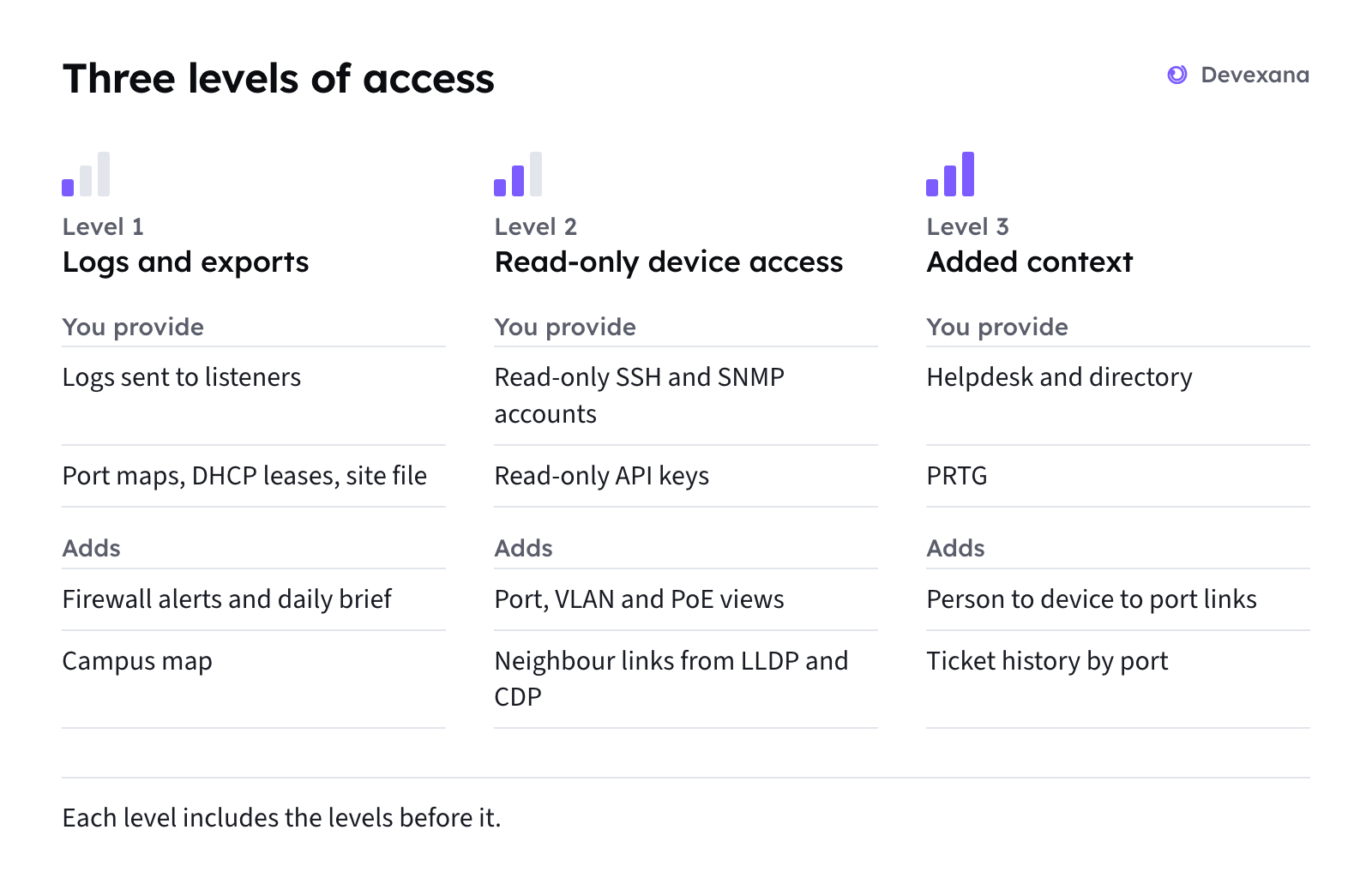
The steps are on Start with logs only. For the capabilities and limits of each level, see Logs, read-only access and evidence: what each level gives you.
Add read-only device access
Read-only switch reads over SSH and SNMP are in production use on Aruba/HP AOS-S (ProCurve) switches. By default, Devexana reads each switch once a day. A person can request a refresh.
- Switch views. The faceplate shows port state, VLAN and PoE class as of the last read (Network views: campus map and switch faceplate).
- Neighbour links. Devexana reads LLDP and CDP neighbour data from your switches over SNMP, NAPALM or the extended SSH read set.
- Campus links. Devexana draws reported switch-to-switch links on the campus map. Devexana does not map physical cable routes.
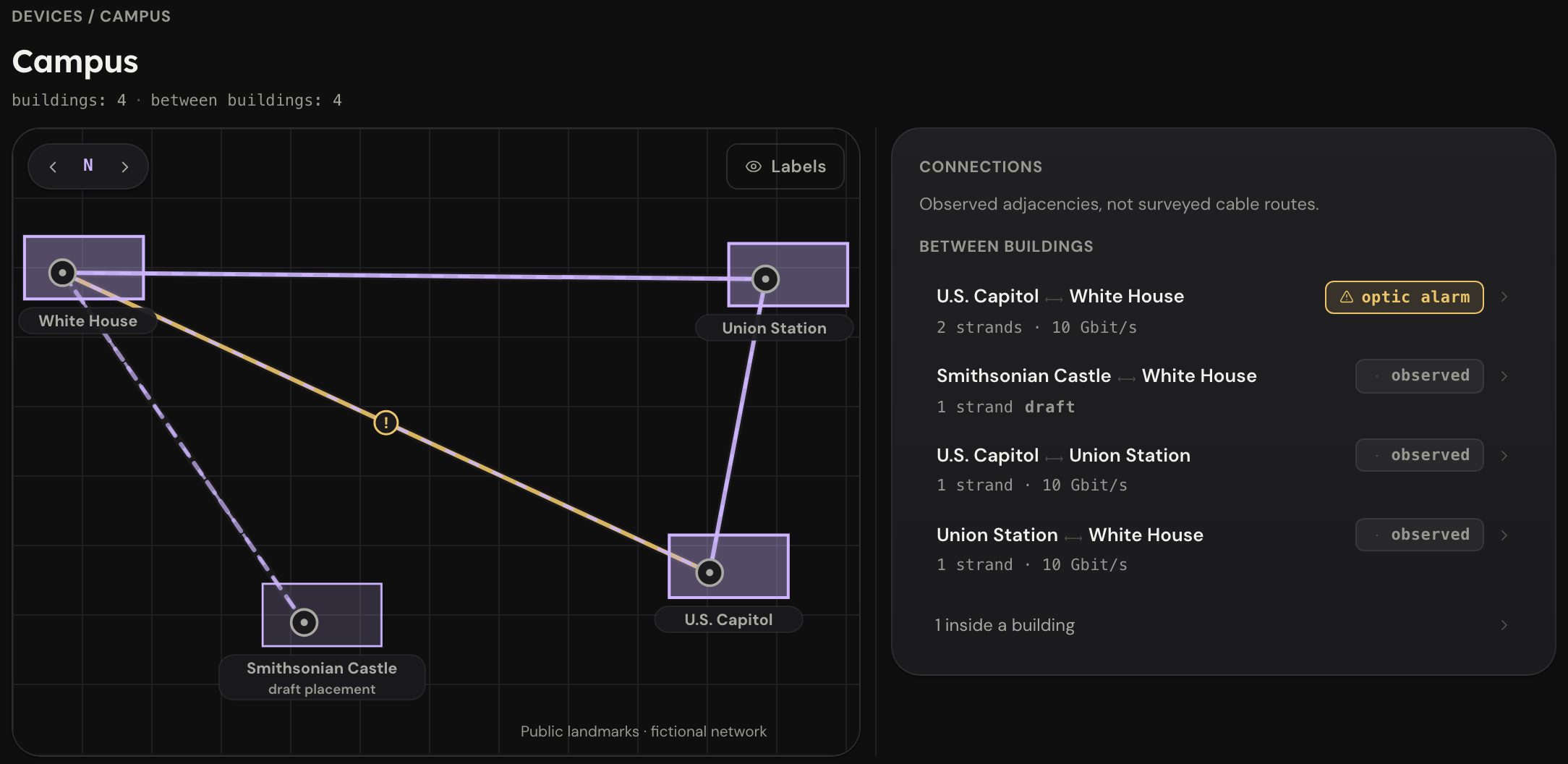
Account setup is on Create read-only accounts. Switch reads are on Switches over SSH and SNMP.
Ask questions with citations
Staff can ask questions in plain language. The assistant builds answers from stored records and links to those records. On a switch page, the assistant reads the switch first and cites those reads.
A citation identifies a record that the assistant used to build the answer. It does not prove that the record supports every sentence. To check an answer against its sources, use the steps on Check an answer against its sources. Questions are on Ask questions.
Multi-vendor campuses
Read-only command sets exist for Cisco IOS/IOS-XE/IOS-XR/NX-OS, Arista EOS, Juniper Junos, Aruba AOS-CX, HP Comware and Dell OS10/OS9/OS6. Their status is Available.
| Vendor family | How Devexana reads it | Status |
|---|---|---|
| Aruba/HP AOS-S (ProCurve) switches | SSH and SNMP | In production use |
| Barracuda CloudGen firewalls | SSH read and syslog | In production use |
| Cisco IOS, IOS-XE, IOS-XR, NX-OS | SSH command set | Available |
| Arista EOS | SSH command set | Available |
| Juniper Junos | SSH command set | Available |
| Aruba AOS-CX | SSH command set | Available |
| HP Comware | SSH command set | Available |
| Dell OS10, OS9, OS6 | SSH command set | Available |
| Cisco Meraki, Cisco Catalyst Center, Aruba Central, Aruba ClearPass | Read-only API sources | Available |
| Fortinet, Palo Alto Networks, Juniper Mist | Read-only API connector | Built during onboarding |
The full vendor table is on Supported vendors and protocols. Product limits are on What Devexana does not do (limitations).
Existing monitoring
A read-only PRTG source is available. Devexana builds read-only API connectors for other monitoring systems during onboarding.
- PRTG. The PRTG source is available.
- Other monitoring systems. For AKiPS, Nagios, Observium, LibreNMS, Zabbix or SolarWinds, Devexana builds a read-only API connector during onboarding. Each connector uses an account that can only read.
- Receive-only listeners. If a device or monitoring tool can send syslog or SNMP traps, it can send them to Devexana's listeners. Each listener is off until an administrator enables it.
- SIEM. Devexana can forward its own audit events to a SIEM. This is off by default. Devexana does not read data from a SIEM.
The PRTG source is on API connectors and ticketing.
Scale
Devexana has not yet run on a campus network, and no campus-scale deployment has been measured.
| Bound | Value in this release |
|---|---|
| Discovery scan range | /22 at most for each scan |
| Default switch read cadence | Once a day for each switch |
| Production deployment | A municipal network, where Devexana reads part of the network's switches |
Where answers are produced
By default, Devexana produces answers with models on the appliance. A deployment can run with no cloud model. In production, customers do not bring their own model keys. If a deployment uses a cloud model, Devexana provides it through Devexana's zero-data-retention (ZDR) agreement on AWS. The optional networking assistant uses a cloud model only when Devexana has set up the cloud connection for that deployment. Other cloud features are off by default. The appliance records each networking assistant request in its egress log. See Outbound connections: the complete list for outbound connections and their logging locations.
Evaluate Devexana for your campus
The evaluation questions, and a first evaluation that needs no device credentials, are on Evaluating Devexana for a campus network.
Applies to Devexana release 0.3.182. Page updated 2026-10-20. Questions or corrections: support@devexana.com.