
Firewall alerts and the daily brief
Devexana processes Barracuda CloudGen syslog into alerts and a daily brief. Local diagnosis and email notices are optional, and all are off by default.
- In production use
- Barracuda CloudGen syslog alerts, daily brief and email notice
- Off by default
- Alerts, diagnosis, daily brief and email on a new appliance
- Available
- Daily log summaries that the assistant can read
Devexana receives Barracuda CloudGen syslog on a receive-only listener. Devexana classifies the lines into five alert types. It can produce local diagnoses, except for traffic information alerts. The daily brief groups the previous day's alerts into issues.
The flow
Devexana processes the logs on the appliance. A person reviews the daily brief. Devexana does not send a command to the firewall at any step.
- Listener. The listener receives syslog. Devexana stores each line for 30 days.
- Classification. Devexana checks new lines after a scheduled source read, at most once every 5 minutes.
- Optional diagnosis. If enabled, the local model diagnoses open alerts except traffic information alerts.
- Daily brief. After midnight local time, Devexana groups the previous day's alerts into issues.
- Optional email. If enabled, Devexana sends one daily notice. The default time is 09:00.
- Person. A person reviews the brief and decides whether to run the proposed commands.
Alert types
Devexana sorts firewall lines into five fixed alert types. The severity and the delivery of each type are fixed.
| Alert type | What it covers |
|---|---|
| Attack signal | A pattern of activity against the firewall: brute-force sign-in attempts, port or host sweeps, or sources that target the same service |
| Silent log stream | A known firewall sends no lines for 30 minutes while the listener is on |
| Administrator configuration change | An administrator signs in, edits the rule set, changes the position, state or logging of a rule, or commits a configuration |
| Unusual blocked traffic | Blocks at a source, destination, port, country or rate that is new for this firewall, for example an internal host that a rule blocks |
| Traffic information | Normal operation: a trend to note, with no action needed. It gets a low severity and does not send email |
Diagnosis
The model on the appliance can write a short diagnosis for each open alert, except traffic information alerts. The diagnosis has a fixed format: a summary, where to look, one proposed check, a confidence and the unknowns.
- Devexana marks each diagnosis as based on the logs. Devexana does not check it against the firewall.
- If a diagnosis names a firewall rule that is not in the data the model received, Devexana flags it and sets the confidence to low.
- If Devexana cannot read the model output, it stores the raw text as a failed diagnosis. It does not write a diagnosis of its own.
- The diagnosis is a written reading of the logs. It does not prove a cause.
Daily brief
The daily brief groups the previous day's alerts into issues. Open it at Networking › Firewall › Daily brief.
For each issue, the brief lists:
- the alerts in the issue and the diagnosis, if diagnosis is on (traffic information alerts are not in the brief);
- checks that Devexana ran over data already stored on the appliance;
- commands for a person to run on the firewall or a switch.
Email notice
The optional email notice carries only a severity, a count and a link back to the appliance. In daily-brief mode, Devexana sends one notice a day.
- The notice contains no log lines, addresses or host names.
- The recipient signs in to the appliance through the link to read the details.
- Devexana records each email send in the egress log and the audit log. See Audit log and the auditor evidence pack.
- The email goes through one SMTP relay that you configure. That relay is an outbound connection. See Outbound connections: the complete list.
Acknowledge an issue
Acknowledging an issue marks all its alerts as acknowledged.
- Open Networking › Firewall › Daily brief.
- Select the issue.
- Select Acknowledge.
Devexana records your name and the acknowledgment in the audit log. Acknowledging changes nothing on the firewall.
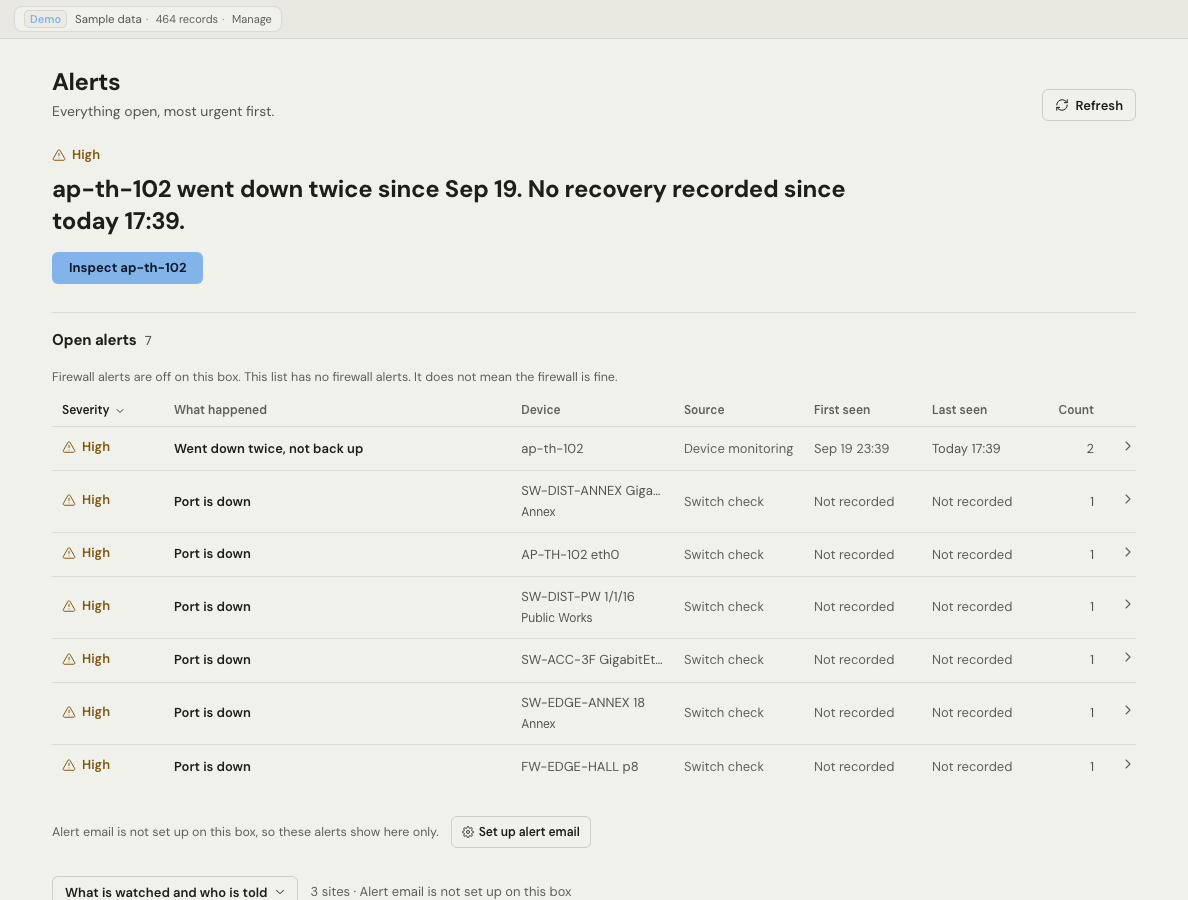
The Alerts page states when firewall alerts are off. An empty firewall list then does not mean that the firewall has no problems.
Turn it on
These settings are off on a new appliance. Alert processing also requires at least one source on a read schedule.
- Put at least one source on a read schedule. See The flow.
- Ask your installer or Devexana support to set the settings in the table below.
| Part | Setting | Where it is set |
|---|---|---|
| Syslog listener | syslog_listener_enabled | An environment setting on the appliance. The listener screen also has an on and off control. See Syslog, SNMP traps and NetFlow |
| Alert classification | firewall_alert_enabled | An environment setting on the appliance. No Settings screen field |
| Diagnosis | firewall_diagnostic_enabled | An environment setting on the appliance. No Settings screen field |
| Email notice | alert_email_enabled, mode daily_brief | Settings › Notifications › Alert email (administrators) |
Only a user whose role can manage sources can change listener settings.
Limits
Applies to Devexana release 0.3.182. Page updated 2026-10-20. Questions or corrections: support@devexana.com.