
How Devexana is delivered
Devexana is a white-glove service: Devexana installs, updates, monitors and supports the appliance for you. Devexana connects your sources with your team. Your team provides the site, the network access and the accounts.
- In production use
- NVIDIA DGX Spark appliance, installed by Devexana
- In production use
- Signed updates with automatic code rollback
- Available
- Daily encrypted database snapshots, on by default
- Off by default
- Encrypted offsite copy to your own S3 bucket
On this page
This page lists what Devexana does, what your team provides, and how the appliance connects to your network.
What Devexana does
| Stage | What Devexana does |
|---|---|
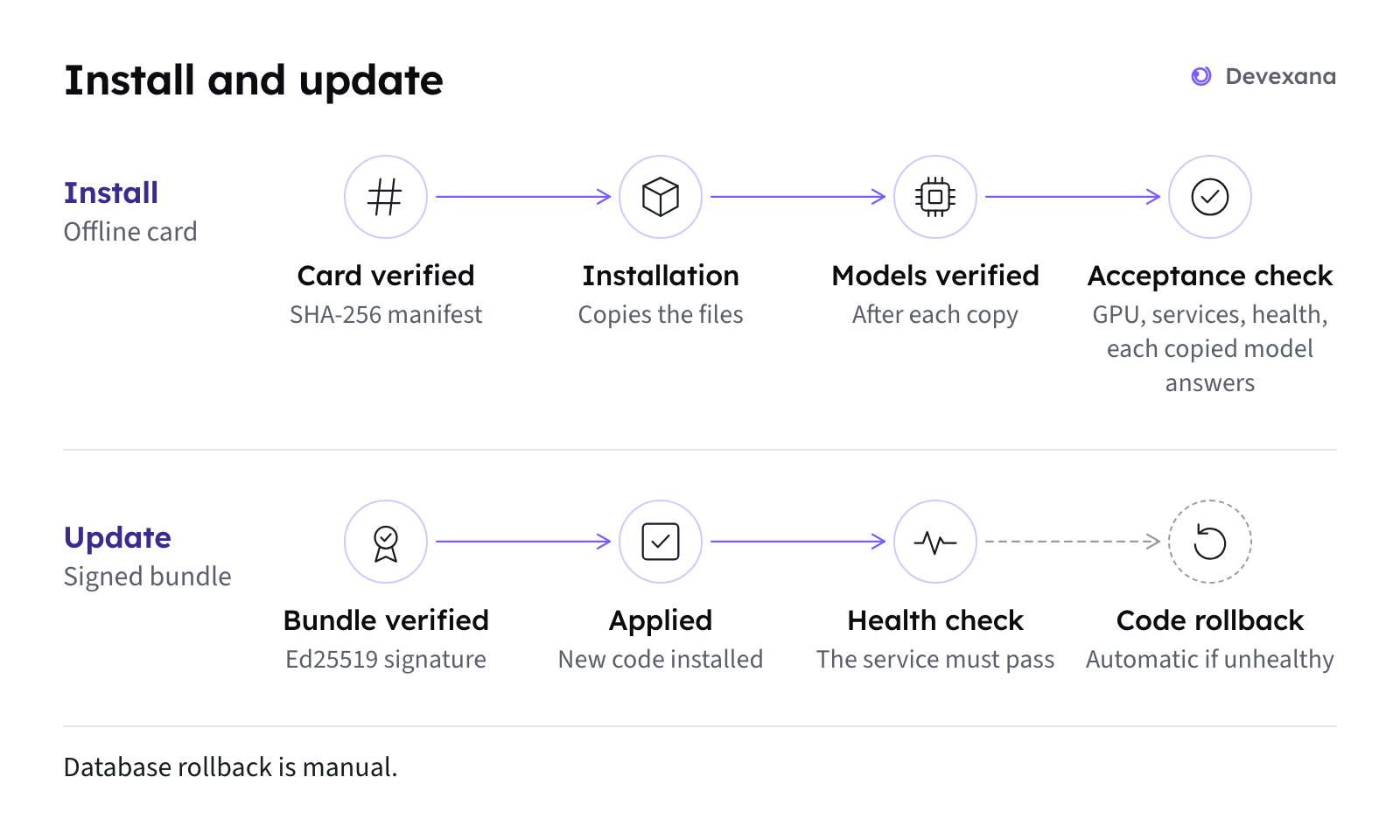
| Install | Devexana installs its software on the appliance. Devexana checks each file and model. Devexana runs an acceptance check of the GPU, services and models |
| Set up | Sets up HTTPS for the web interface, creates the first administrator account and gives it to your named contact |
| Connect | Connects the read-only sources with your team. An administrator on your team approves each read function |
| Update | Delivers signed updates. The appliance verifies each update before installation |
| Monitor | Checks the health of the service, the models, the sources and the backups |
| Support | Answers questions and fixes problems through support@devexana.com |
What your team provides
| Item | Detail |
|---|---|
| A site for the appliance | A secure location with power. Follow NVIDIA's guidance for the DGX Spark. Devexana does not publish thermal, power or rack figures |
| A network location | A management network that reaches your sources and that staff reach over HTTPS. See Network placement |
| Firewall openings | The ports in the table below. Keep a default-deny outbound rule for the appliance |
| Read-only accounts | One account for each source, with read access only. See Create read-only accounts |
| A named contact | One person who receives the first administrator account and works with Devexana support |
The appliance
| Part | Value |
|---|---|
| System | NVIDIA DGX Spark (GB10), 128 GB unified memory |
| Operating system | DGX OS |
| Models | Run on the appliance. The model server listens only on the appliance itself |
Devexana supports only the NVIDIA DGX Spark. Jetson boards, general x86 servers and virtual machines are not install targets.
Network placement
Place the appliance on a management network that meets these conditions:
- The appliance can reach the network devices and systems that Devexana reads.
- If you use listeners, your network devices can send records to the appliance.
- Staff on your IT subnet can reach the web interface over HTTPS.
- Your firewall controls what the appliance can reach.
The operating system needs a one-time online package install during installation. Plan this network access with Devexana.
Ports
| Direction | Port | Use | State |
|---|---|---|---|
| Inbound | TCP 443 | HTTPS web interface | Set up by Devexana. Devexana confirms the port at installation |
| Inbound | TCP 42108 | Web interface and API over plain HTTP, behind the HTTPS front | Open to your IT subnet only. Give staff the HTTPS address |
| Inbound | UDP 514, 162, 2055 (or a port above 1024) | Syslog, SNMP traps, NetFlow and IPFIX listeners | Off |
| Inbound | UDP 5353 | mDNS name of the appliance on the LAN | On |
| Outbound | TCP 22, UDP 161 | SSH and SNMP reads of switches, routers and firewalls | When a source is added |
| Outbound | TCP 443 | API sources, for example the helpdesk | When a source is added |
| Outbound | TCP 636 | LDAPS directory reads | When a source is added |
| Outbound | SMTP | Alert email through your relay | Off |
| Outbound | DNS and NTP | Your internal DNS and time servers | On |
| Outbound | HTTPS | Optional cloud features | See Outbound connections: the complete list |
Ports and protocols lists every port, with discovery probes and webhook receivers.
Names on your network
The appliance publishes <short name>.local over mDNS on its network segment. For a DNS name, add an A record for the appliance's IP address on your DNS server. The IP address works without either name.
Updates and backups
- Updates. The appliance refuses an update with a wrong signature, target, version or file hash. If the service fails its health check after an update, the appliance restores the previous code.
- Backups. The appliance takes an encrypted database snapshot every 24 hours and keeps 14. Devexana records each snapshot in the audit log.
- Offsite copy. An encrypted copy to your own S3 bucket is off by default.
- Database key. Snapshots do not contain the database key file. Agree with Devexana who keeps a protected copy of the key.
- Restore. Devexana support restores the database from a snapshot when a restore is necessary.
Access for Devexana
The signed heartbeat to Devexana Cloud is off by default. The vendor support channel is off by default. The Government/Education edition has no remote-access feature. In the Business edition, WireGuard remote access exists, and an administrator turns it on.
Contact
Send questions and problem reports to support@devexana.com. Include the time of the problem and the page or answer where you saw it.
Applies to Devexana release 0.3.182. Page updated 2026-10-20. Questions or corrections: support@devexana.com.