
A switch is listed but not read
Check why a listed switch has no port, neighbour or configuration data.
- In production use
- Aruba/HP AOS-S (ProCurve) switch reads over SSH and SNMP
- Available
- Other listed switch families
- Off by default
- Extended SSH read set (an administrator turns it on)
Use the symptoms below to diagnose missing switch data or unavailable console access.
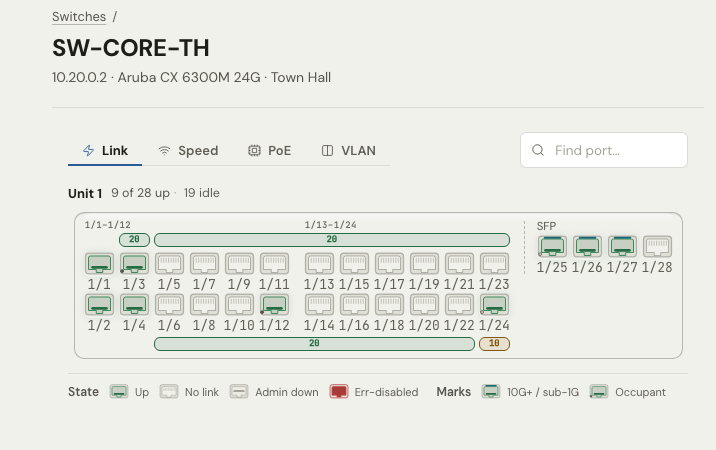
If no read method reaches a switch, its faceplate still opens. It marks the switch as not reachable and shows the ports from your port map.
What Devexana reads by default
By default, Devexana reads a switch's running configuration once a day over SSH. Port state, PoE, VLANs and LLDP neighbours come from SNMP, or from an extended read set that an administrator turns on.
| Data | Comes from |
|---|---|
| Running configuration | SSH, once a day by default |
| Port state, PoE class, VLANs | SNMP, or the extended SSH read set |
| LLDP and CDP neighbours | SNMP, or the extended SSH read set |
Match the symptom
Find your symptom in the table. Then follow the linked section.
| Symptom | Cause | Action |
|---|---|---|
| The faceplate marks the switch as not reachable | No read method reaches the switch. | Follow The faceplate marks the switch as not reachable. |
| The console does not open | The switch is set up for SNMP only. | For console access, follow The console says that the switch is set up for SNMP. |
| No SSH account is stored | No SSH credential is stored. | Follow The switch has no SSH credential. |
| The SSH session opens, but nothing is read | The switch refuses SSH command execution. | Follow The switch refused SSH command execution. |
| The read is marked as rejected | The switch does not understand a command. | Follow The read is marked as rejected. |
| Devexana refuses to connect | The SSH host key changed. | Follow The host key of the switch changed. |
| The source exists, but nothing is read | The read functions are not approved. | Ask an administrator to approve the required read functions. |
| No ports or neighbours | Only the configuration is read. | Follow Only the configuration is shown, with no ports or neighbours. |
| A new switch has no data | The first scheduled read has not run. | Follow The switch is new and has no data. |
| The source health is broken or expired-credential | Reads fail. | See Source health states. |
Symptoms
The faceplate marks the switch as not reachable
What happened
No read method reached the switch. The faceplate shows the ports from your port map only. The result is capability_missing.
Why
The address, the credential or the transport on the source is wrong, or the network path to the switch is blocked.
What to do
- Open the switch source on the Connectors page.
- Check the address, the credential and the transport.
- Select Test connection.
- If the test fails, make sure that the appliance can reach the switch on TCP 22 or UDP 161. See Ports and protocols.
If this does not fix it
Send an email to support@devexana.com. Include the switch model, its software version and the result of Test connection.
The console says that the switch is set up for SNMP
What happened
The read-only console does not open for this switch.
Why
SNMP reads values but cannot run commands. The console needs SSH.
What to do
- Open the switch source on the Connectors page.
- Set Transport to SSH.
- Add the credentials for a read-only SSH account. See Create read-only accounts.
- Select Test connection.
If this does not fix it
Send an email to support@devexana.com. Include the switch model and the result of Test connection.
The switch has no SSH credential
What happened
Devexana has no SSH account to use for this switch.
Why
The source uses SNMP only, or Devexana has no saved SSH credential.
What to do
- Create a read-only account on the switch. See Create read-only accounts.
- Open the switch source on the Connectors page.
- Add the credential.
- Select Test connection.
If this does not fix it
Send an email to support@devexana.com. Include the switch model and the result of Test connection. Do not send the credential.
The switch refused SSH command execution
What happened
The SSH session opened, but the switch did not run the command. Devexana read nothing. Devexana stored nothing.
Why
The switch does not accept SSH command execution. Devexana records that nothing was read. It does not store an empty result.
What to do
- If the switch software permits SSH command execution, turn it on.
- If you cannot turn on SSH command execution, add SNMP read access for port data.
- Select Sync now.
If this does not fix it
Send an email to support@devexana.com. Include the switch model, its software version and the error text from the run history.
The read is marked as rejected
What happened
The switch did not understand a command. Devexana marks the read as rejected. It does not store an empty table.
Why
The detected platform does not match the switch, or the switch software does not accept a command in the read set. See Switches over SSH and SNMP.
What to do
- Open the switch source on the Connectors page.
- Read the detected platform.
- Compare it with the model and the software of the switch.
- If the platform does not match the switch, send the details to support.
If this does not fix it
Send an email to support@devexana.com. Include the switch model, its software version and the rejected command from the run history.
The host key of the switch changed
What happened
Devexana refused to connect to the switch.
Why
Devexana pins each switch's SSH host key the first time it connects. It refuses a different key until a person with the permission to manage sources trusts it.
What to do
- Ask your network team if the switch was replaced, reset or given a new key.
- Obtain the switch's host-key fingerprint through a trusted management connection.
- Compare it with the new fingerprint shown by Devexana.
- If they match, trust the new key from the console.
- Select Sync now.
If this does not fix it
Send an email to support@devexana.com. Include the switch model, the time of the refusal and the error text.
The read functions are not approved
What happened
The source exists, but Devexana does not read from it.
Why
Each read function stays off until an administrator approves it.
What to do
- Open the switch source on the Connectors page.
- Ask an administrator to approve the required read functions.
- Select Sync now.
If this does not fix it
See Source health states.
Only the configuration is shown, with no ports or neighbours
What happened
The switch has a running configuration, but no port state, PoE, VLANs or neighbours.
Why
The default SSH read is the running configuration once a day. Port state, PoE, VLANs and LLDP neighbours come from SNMP or from the extended SSH read set.
What to do
- Add SNMP read access to the switch source. See Switches over SSH and SNMP.
- If you cannot add SNMP, ask your administrator to turn on the extended SSH read set.
- Select Sync now.
If this does not fix it
Send an email to support@devexana.com. Include the switch model and the list of data that is missing.
The switch is new and has no data
What happened
The switch appears, but it has no data yet.
Why
By default, the first scheduled read can start up to 24 hours later.
What to do
- Open the switch source on the Connectors page.
- Select Sync now.
If this does not fix it
See Source health states.
Applies to Devexana release 0.3.182. Page updated 2026-10-20. Questions or corrections: support@devexana.com.